> ## Documentation Index
> Fetch the complete documentation index at: https://docs.apiyi.com/llms.txt
> Use this file to discover all available pages before exploring further.
# GPT-Image-2.5-All Image Gen/Editing
> GPT image generation reverse-engineered model gpt-image-2-all (ChatGPT web line). Flat $0.03/image per-call pricing, ~30–60s generation. Supports text-to-image, multi-image fusion editing, natural-language editing, high text-rendering fidelity, Chinese prompt friendly.
All image APIs are **synchronous** — there is no task ID to poll, and if your client disconnects the result is lost while the request is still billed. Set a generous timeout for this model; see [Image API Essentials & Best Practices](/en/api-capabilities/image-api-best-practices).
## Overview
**gpt-image-2.5-all** and **gpt-image-2-all** are APIYI's **GPT image generation reverse-engineered models** (ChatGPT web line). The ChatGPT web app has moved to Images 2.5 as a whole, so `gpt-image-2-all` already produces 2.5 images; the new `gpt-image-2.5-all` name simply makes that upgrade explicit — **both names share the same price and behavior and are interchangeable**; new projects should use `gpt-image-2.5-all`. With extremely competitive pricing at **\$0.03/image** per call, it generates images in **about 30–60 seconds** and supports **text-to-image / single-image editing / multi-image fusion / natural-language editing** — with high text-rendering fidelity and native support for Chinese prompts.
**🎨 Highlights**: Reliable reverse-engineered channel with a flat \$0.03/image rate. No need to worry about size/quality/n parameters — just describe size and style in the prompt. Uses the OpenAI Images API standard endpoints: `/v1/images/generations` (text-to-image) and `/v1/images/edits` (image editing).
**Need to lock the output size or 4K?** Switch to the sister model [`gpt-image-2-vip`](/en/api-capabilities/gpt-image-2-vip/overview) — same call format, just one extra `size` field.
`/v1/images/generations` — generate images from text prompts.
`/v1/images/edits` — multipart upload with edit/fusion instructions.
## Let an AI Agent Do the Integration
If you build with Codex / Claude Code / Cursor, copy the prompt below and hand it to your agent. It first fetches the plain-text version of this page (append `.md` to any docs URL), then writes code in your project's own stack — timeout, base64 rendering, upload compression, and the parameters this model rejects are already baked into the requirements.
Integrate / troubleshoot gpt-image-2-all text-to-image and image editing in this project.
Read the docs before you touch code: fetch [https://docs.apiyi.com/en/api-capabilities/gpt-image-2-all/overview.md](https://docs.apiyi.com/en/api-capabilities/gpt-image-2-all/overview.md) for the plain-text version of this page. For finer parameter detail, append `.md` to the text-to-image and image-edit pages the same way.
Requirements:
1. Timeout: raise the client timeout to 360 seconds. The image APIs are synchronous — there is no task ID, so if the client disconnects the result is lost while the request is still billed. Wait rather than time out early. Reverse proxies, gateways and serverless execution limits all need widening too: any layer shorter than the generation time will cut the request off.
2. Rendering the response: the default is base64 (`b64_json`, with no `data:` prefix); you can also pass `response_format` set to url to get a CDN link instead. **Always send `response_format` explicitly rather than relying on the default** — the default behavior has changed with group and load in the past. If you take base64, render it and offer a save-to-disk action; if you take a URL, note it expires in about 24 hours, so download and re-host it server-side immediately. Each entry in `data[]` carries only one of the two fields, so parse defensively for both.
3. Compress before upload: before calling `/v1/images/edits` (multipart), compress each reference image — only process files above 1.5MB, scale the long edge down to 2048px keeping the aspect ratio (never upscale a small image), re-encode at quality 0.9 and keep the original format. Keep the combined size under 6MB for multi-image requests, and no single image above 10MB. If one image fails to compress, fall back to the original and carry on — never abort the whole request over a compression failure.
4. Parameter red lines: this model does **not** accept `size`, `quality`, `n` or `aspect_ratio`. Do not send any of them. Two traps in particular: sending `n` set to 3 bills you for 3 images but still returns only 1; and the OpenAI SDK method `client.images.generate()` sends `size` and `n` by default, so **issuing a raw HTTP request is safer here**. Output dimensions are steered by a prompt prefix instead (for example, opening the prompt with a landscape 16:9 instruction). This page has a verified prompt-to-resolution table — follow it.
5. Read the key from the `APIYI_API_KEY` environment variable and use [https://api.apiyi.com/v1](https://api.apiyi.com/v1) as the base URL. Never hardcode it, never commit it to git.
6. When you are done, actually run one text-to-image call and one image-edit call, then show me the results and what those two calls cost.
| Requirement | Pitfall it prevents |
| - | - |
| Timeout raised to 360s | Mainstream HTTP clients default to a 30-60s timeout and cut the request off while the server is still generating normally — and **a disconnected request is still billed**. See [Image API Essentials & Best Practices](/en/api-capabilities/image-api-best-practices) |
| Send `response_format` explicitly | The default has changed before; without it you must handle both `url` and `b64_json` shapes |
| Never send `n` | Sending 3 bills you for 3 images but still returns only 1 |
| Never send `size` / `quality` | This model rejects both; dimensions come from a prompt prefix instead |
| Compress before upload | Phone photos routinely run 4-5MB, and base64 encoding inflates them by roughly 33% on top of that. See [Image Compression & Output Resolution](/en/api-capabilities/image-compression-resolution) |
## Core Features
Flat per-call pricing of \$0.03/image, no resolution tiers, predictable costs
Stable rendering of Chinese/English text, signs, and poster text — ideal for infographics and marketing assets
Native understanding of Chinese descriptions without translation
Supports multiple reference images; prompts can reference them as "image1/image2/image3"
\~30–60s generation — faster than both `gpt-image-2-vip` and the official-relay `gpt-image-2`
Pass `response_format: "url"` explicitly for R2 CDN links with low-latency global delivery
Edit via conversational descriptions, no masks required, supports multi-turn iteration
Compatible with the OpenAI Images API standard endpoints `/images/generations` and `/images/edits`
## Pricing
| Model | Billing | Price | Output |
| - | - | - | - |
| `gpt-image-2-all` | Per-call | **\$0.03 / image** | 1 image per call |
| `gpt-image-2.5-all` | Per-call | **\$0.03 / image** (same as -all) | 1 image per call, backed by GPT-Image 2.5 |
**Billing notes**:
* Flat pricing; no tiers by resolution, quality, or prompt length
* Failed requests are not charged (auth failures, parameter validation errors)
* For N images, call the API N times in parallel
**Same-price sister model**: [`gpt-image-2-vip`](/en/api-capabilities/gpt-image-2-vip/overview) (Adobe reverse line (Firefly)) — same \$0.03/image, supports 30 explicit sizes (incl. 4K), same call format. Switch when you need locked output dimensions.
## Group Setup
`gpt-image-2-all` lives on the `Default` group — **no extra group needed**. The reverse channel currently has stable supply, so there's no enterprise-group fallback story like the official-relay `gpt-image-2` has.
| Model | Group | Notes |
| - | - | - |
| `gpt-image-2-all` | `Default` | ChatGPT-web reverse, flat \$0.03/img, \~30–60s |
| `gpt-image-2.5-all` | `Default` | GPT-Image 2.5 version of the same line, flat \$0.03/img, same groups as -all |
| `gpt-image-2-all` | `image2_OSS` | **1x multiplier (no surcharge)**, deterministic URL output — never falls back to base64 when the default group is under load |
### Need deterministic URL output → switch to the `image2_OSS` group
As measured in July 2026 on the default group, `gpt-image-2-all` (and `gpt-image-2-vip`) return `b64_json` when `response_format` is omitted; pass `response_format: "url"` explicitly to get an image URL. The default group's output format is **not guaranteed** — it has historically defaulted to `url` with fallback to `b64_json` under load, and has changed across channel versions.
If your business **depends on URL output** (writing URLs straight to your database, frontend rendering by URL, base64 not acceptable), switch your token's group to **`image2_OSS`** — a group purpose-built for **deterministic URL output**, at a **1x multiplier (no surcharge)**, effective for both reverse models `gpt-image-2-all` and `gpt-image-2-vip`. It guarantees the response always carries an image URL and never falls back to base64.
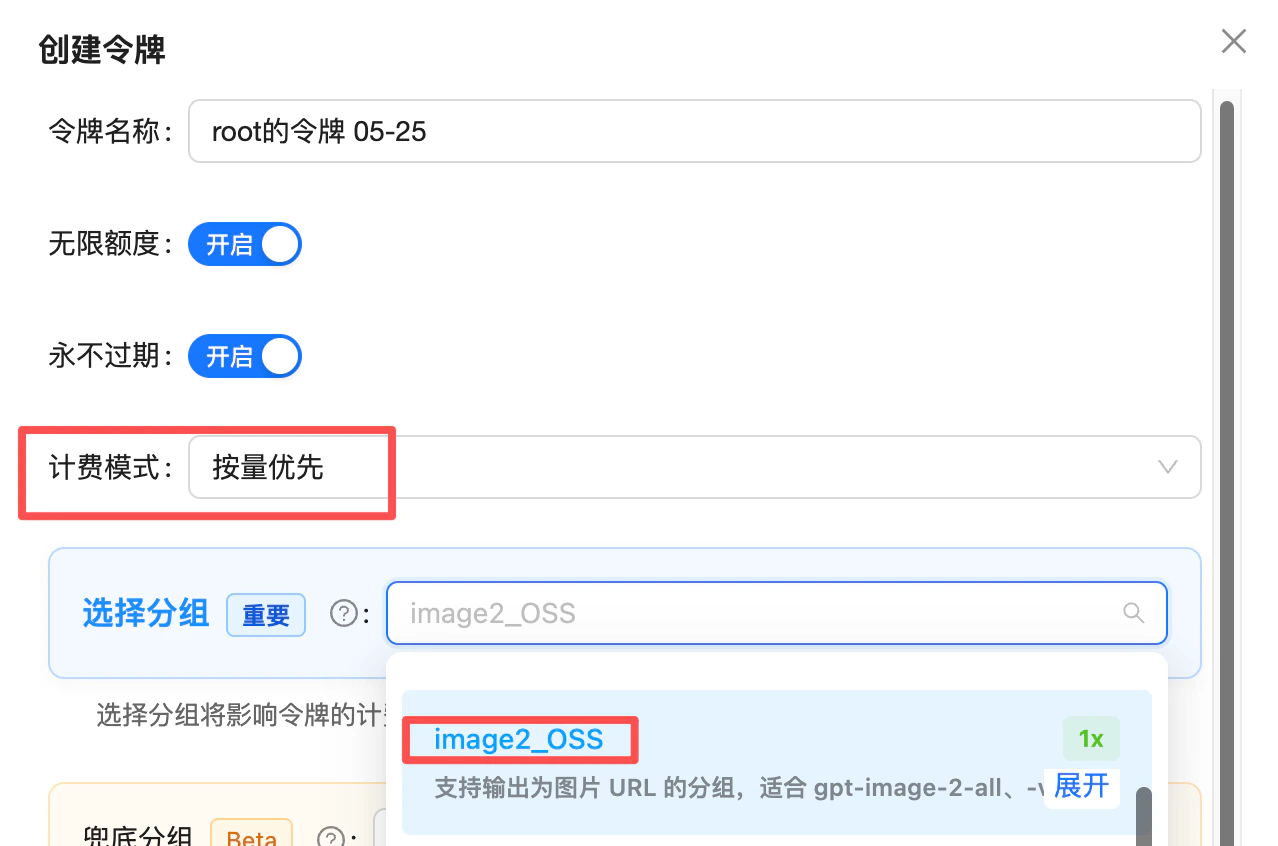 **Advanced (when you also use `gpt-image-2-vip` and the official-relay `gpt-image-2`)**: if your token covers all three models, set the token's group priority like this:
* **First priority**: `image2Enterprise` (1.2x enterprise group, dedicated stable lane for the official relay)
* **Default fallback**: `Default` (both reverse models live here and route by model)
Result: official-relay `gpt-image-2` rides the enterprise lane for stability, while the two reverse models stay on the default group — one token covers all three, no interference.
📖 About the `image2Enterprise` group: [/en/live/2026-04/image2-enterprise-stable](/en/live/2026-04/image2-enterprise-stable)
## Technical Specs
| Attribute | Value |
| - | - |
| **Model name** | `gpt-image-2-all` |
| **Channel type** | Official reverse-engineered (ChatGPT web) |
| **Pricing** | \$0.03 / image, per-call |
| **Generation time** | \~30–60 seconds |
| **Output resolution** | No explicit size parameter; adaptive (describe in prompt) |
| **Default response format** | `b64_json` (raw base64, **no `data:` prefix**, verified 2026-07; always pass `response_format` explicitly) |
| **Optional format** | `url` (R2 CDN accelerated link, **\~1-day validity**, requires explicit `response_format: "url"`) |
| **Chinese prompts** | ✅ Natively supported |
| **Capabilities** | Text-to-image, single-image editing, multi-image fusion, natural-language editing |
This model has **adaptive output sizes** and is not equivalent to the official `gpt-image-2` API. For strictly locked output sizes or 4K, use [`gpt-image-2-vip`](/en/api-capabilities/gpt-image-2-vip/overview) (Adobe reverse line (Firefly), 30 explicit sizes including 4K). For full official-API parity, use [`gpt-image-2`](/en/api-capabilities/gpt-image-2/overview).
**⏰ Image URL validity: \~1 day (default)**
The `url` field of a `url`-mode response is an R2 CDN link that **expires in about 24 hours** — requests after that will 404. For images that need long-term retention (product shots, user artwork, history records, etc.), **download and persist them to your own storage as soon as possible** after generation.
Two common approaches:
* **Server-side download**: as soon as you receive the response, use `requests` / `fetch` to pull the image and store it in S3 / OSS / R2 / local disk
* **Use `b64_json` response format**: you get the image as base64 data directly, skipping the extra cross-origin download — perfect for frontend rendering or writing straight to a file
## Endpoints
| Endpoint | Purpose | Content-Type | Best for |
| - | - | - | - |
| `POST /v1/images/generations` | Text-to-image | `application/json` | OpenAI Images API standard format — same code can hit both official and reverse channels |
| `POST /v1/images/edits` | Image editing (single/multi) | `multipart/form-data` | OpenAI Images API standard format — same code can hit both official and reverse channels |
**Use the OpenAI Images API** (`/v1/images/generations` + `/v1/images/edits`), for two reasons:
1. **More stable**: upstream resource supply for the Images API channel is more plentiful, so call success rates are higher
2. **Compatible with the official relay for easy switching**: the call method and parameters like `size` are fully compatible with the official-relay [`gpt-image-2`](/en/api-capabilities/gpt-image-2/overview) — if the reverse channel hits risk-control turbulence, **just swap the `model` name** with zero code changes
There is also a chat-based endpoint (`/v1/chat/completions`, no longer recommended) — see the FAQ below.
**Domain options**: `api.apiyi.com` is the main domain. You can also use alternate gateway domains such as `b.apiyi.com`. Response behavior is identical.
**Want to lock the output size with a `size` parameter?** Use the sister model [`gpt-image-2-vip`](/en/api-capabilities/gpt-image-2-vip/overview) — identical endpoints, just one extra `size` field (30 explicit sizes including 4K).
## Size and Aspect Ratio Control (describe in prompt)
`gpt-image-2-all` has no `size` parameter — size is described in the prompt. If you need strictly locked output sizes (e-commerce hero shots, poster templates, 4K wallpapers), use [`gpt-image-2-vip`](/en/api-capabilities/gpt-image-2-vip/overview) instead.
### Verified "prompt phrasing → actual resolution" table
The 8 phrasings below have been empirically verified to reproduce reliably. Put the first-column phrasing at the **start** of your prompt and you'll get the resolution shown in the second column (all outputs sit at the \~1.5K-pixel tier):
| Prompt phrasing (sent verbatim) | Verified resolution | Approx. size | Actual ratio |
| - | - | - | - |
| `横版 16:9` (Landscape 16:9) | 1672 × 941 | \~1.9 MB | 16:9 |
| `竖屏 9:16` (Portrait 9:16) | 941 × 1672 | \~2.1 MB | 9:16 |
| `4:3` | 1448 × 1086 | \~2.3 MB | 4:3 |
| `3:4` | 1086 × 1448 | \~2.5 MB | 3:4 |
| `3:2 尺寸` (3:2 size) | 1536 × 1024 | \~2.9 MB | 3:2 |
| `2:3 尺寸` (2:3 size) | 1024 × 1536 | \~3.0 MB | 2:3 |
| `2:5 竖屏` (2:5 portrait) | 793 × 1983 | \~1.9 MB | 2:5 |
| `5:2 横屏` (5:2 landscape) | 1983 × 793 | \~1.9 MB | 5:2 |
**Notes**:
* All outputs are in the **\~1.5K-pixel tier** (longest edge between 1500 and 2000 px). This is the model's effective ceiling — it's not truly "any resolution".
* Reproducibility is highest when the prompt **only** contains a phrasing from the table; mixing in other composition words causes drift.
* The Chinese strings are the actual values you send; we recommend keeping them as-is rather than translating.
### Stylistic phrasings (no fixed resolution)
The phrasings below have no verified resolution — use them only as style modifiers, paired with the table above:
| Need | Phrasing (style guidance only — no resolution guarantee) |
| - | - |
| Square | `1024×1024 square` / `1:1 square composition` |
| Ultra-wide banner | `Banner 21:9 ultra-widescreen` |
| Style modifier | `cinematic` / `phone poster` / `square composition` |
**Tip**: Put size/composition words at the **beginning** of the prompt for better adherence.
### Exposing this table to your end users
Even though `gpt-image-2-all` has no `size` parameter, you can still offer your users a "Size / Aspect Ratio" dropdown that **feels just like an official `size` field**:
* Use the prompt phrasing from the table above as the option `value` (e.g., `横版 16:9`)
* Show the **expected resolution** in the option label (e.g., `Landscape 16:9 (1672×941)`) so users know what they'll get
* On the backend, prepend the selected phrasing to the user's original prompt before sending it to the API
```js theme={null}
const SIZE_OPTIONS = [
{ label: "Landscape 16:9 (1672×941)", prefix: "横版 16:9" },
{ label: "Portrait 9:16 (941×1672)", prefix: "竖屏 9:16" },
{ label: "4:3 (1448×1086)", prefix: "4:3" },
{ label: "3:4 (1086×1448)", prefix: "3:4" },
{ label: "3:2 (1536×1024)", prefix: "3:2 尺寸" },
{ label: "2:3 (1024×1536)", prefix: "2:3 尺寸" },
{ label: "2:5 portrait (793×1983)", prefix: "2:5 竖屏" },
{ label: "5:2 landscape (1983×793)", prefix: "5:2 横屏" },
];
const finalPrompt = `${selected.prefix}, ${userPrompt}`;
```
The underlying model is still **adaptive** — small pixel-level deviations are normal. Don't promise pixel-perfect output to your end users. **For strictly locked output sizes** (e-commerce hero shots, poster templates, 4K wallpapers), use the sister model [`gpt-image-2-vip`](/en/api-capabilities/gpt-image-2-vip/overview) — same price, same call code, just one extra `size` field.
## Best Practices
Compress each image you upload to **under 1.5MB** (JPEG quality 80-90 / down-sized resolution); apply the same cap per image in multi-image fusion. Sporadic server-side errors are most often triggered by oversized inputs — compressing measurably improves success rate and latency. **Output resolution is governed by the prompt phrasing, not by input size** — shrinking the input only speeds things up, it does not hurt quality. Stuffing `4K` / `8K` into the prompt does not produce a high-resolution image either; for reliable larger output, use the verified phrasings in the "Verified prompt phrasing → actual resolution" table above.
Ratio, resolution, and composition words at the front yield better adherence.
Text rendering fidelity is a key selling point — signs, posters, infographics with Chinese/English text all work well.
The order in which you repeat the `image` field is meaningful. Reference explicitly as "image1/image2/image3" in the prompt.
Use `b64_json` for direct web rendering; `url` for server-side storage/forwarding.
Typical generation is 30–60s, but image upload / download time and reverse-channel peak tails make actual end-to-end time vary widely. **Set 300s as a conservative baseline** to avoid frequent false timeouts.
`gpt-image-2-all` rejects `size`, `n`, `quality`, `aspect_ratio` — sending them may trigger validation errors. To pass `size`, switch to [`gpt-image-2-vip`](/en/api-capabilities/gpt-image-2-vip/overview).
## Error Codes and Retries
| Status | Meaning | Suggestion |
| - | - | - |
| `401` | Invalid token | Check Bearer Token |
| `429` | Rate limit / quota exhausted | Exponential backoff retry |
| `5xx` | Transient gateway/backend error | Retry 1–2 times |
| Timeout | Reverse-channel peak + image upload/download long tail | Set client timeout **≥ 300s** (conservative) |
**Client recommendations**:
* Request timeout **starting at 300 seconds** (conservative; typical 30–60s, but image upload / download and reverse-channel peak tails cause wide variance — 120s causes frequent false timeouts)
* Use **exponential backoff** for 5xx and timeouts (2–3 retries recommended)
* Log the `request-id` response header for debugging
## FAQ
Both are reverse-engineered channels at the same price (\$0.03/call), with **identical call format**. The differences are `size` support and generation time:
* **Don't need strict size control, want faster output** → `gpt-image-2-all` (\~30–60s, describe size in the prompt).
* **Need locked output size or 4K** → [`gpt-image-2-vip`](/en/api-capabilities/gpt-image-2-vip/overview) (\~90–150s, 30 explicit sizes incl. 4K).
* **Need a `quality` knob or full OpenAI-API field parity** → use the official [`gpt-image-2`](/en/api-capabilities/gpt-image-2/overview).
No. This model returns 1 image per call. For N images, call the API N times in parallel. Each call is billed independently at \$0.03.
**No.** This model returns 1 image per call — for multiple images, use **repeated / concurrent calls** instead.
⚠️ **Important**: if you pass `n=3` in the request, **billing will be 0.03 × 3 = \$0.09**, but **only 1 image is actually returned**. Make sure to drop the `n` field from your requests to avoid wasted charges.
This is a reverse-engineered channel using **synchronous chat-style responses**. Outcomes split into two cases with **different billing rules**:
**1) HTTP 5xx returned → NOT billed**
When upstream content policy hard-blocks the request, you'll see something like:
```json theme={null}
{
"error": {
"message": "Image was not generated as expected. Please adjust the prompt and retry (traceid: 0672821c6951af183dbf847130caaf16)",
"localized_message": "Unknown error",
"type": "invalid_request_error",
"param": "",
"code": null
}
}
```
These hard errors are **not billed**. Ask the user to adjust the prompt and retry.
**2) HTTP 200 with a text "soft refusal" → BILLED**
When the model soft-refuses inside the conversation (e.g. "I can't do that", "Sorry, this request involves…"), at the protocol level it looks like a normal chat completion, so **it is billed**. The reverse channel cannot reliably distinguish "refusal text" from "image output" at the protocol layer.
**Why we can't just waive soft refusals**
Auto-waiving every soft refusal would mean the platform absorbs every failed upstream call. More importantly, **frequently triggering upstream content safety also raises the risk of the supplier's account being banned** — that's a real supply-side cost we can't fully eliminate.
**Recommendations for integrators**
* ✅ **Pre-filter and warn users**: add a keyword/scenario filter at the frontend or gateway (real-person names, copyrighted characters, sensitive topics) and surface a UI hint like "Celebrity / IP topics may fail and still be billed by upstream policy." This cuts wasted charges sharply.
* ✅ **Monthly reimbursement for consumer products**: we understand consumer-facing products can't fully gate user input. If your monthly spend is large enough (**\$1000+/month**), you can **batch your logs monthly** (short-latency calls are usually soft refusals) and contact support for a one-off manual credit — no need to file per-call appeals.
📖 Related: [500 errors are usually content-policy hits (not billed)](/en/live/2026-04/gpt-image-2-all-500-content-policy)
**Detect first, then handle.** As verified in July 2026, the returned `b64_json` is **raw base64 without the `data:` prefix** — decode it to write a file, or prepend the prefix yourself before rendering; **earlier versions did include the prefix**. Add a `startsWith('data:')` check in your code: if the prefix is present, use the value directly as `img src`; if not, decode or prepend first — this avoids double-prefixing or decoding a prefixed string into a broken image.
Adaptive models treat size descriptions as "guidance" rather than "forced". To improve adherence: put size/composition words at the very start of the prompt, and combine with style descriptors (e.g., `cinematic`, `phone poster`, `square composition`).
For phrasings that **reliably** map to a specific resolution, see the "Verified prompt phrasing → actual resolution" table earlier in this page (under "Size and Aspect Ratio Control").
**Yes, strongly recommended.** Compress each input image to **under 1.5MB** (JPEG quality 80-90 / down-sized resolution): sporadic server-side errors are most often triggered by oversized inputs, and compressing measurably improves success rate and latency. Note: 1.5MB is the **recommended ceiling** for reliability and speed; the 10MB number in the FAQ above is the gateway hard limit.
**Don't worry about compression hurting quality** — this model's output resolution is governed by the prompt's composition phrasing, not by your input size. Shrinking the input only speeds things up.
**Stuffing `4K` / `8K` into the prompt does not actually produce a high-resolution image** — those words are decoration, the model doesn't bump resolution because of them. For reliable larger output, use the verified phrasings in the "Verified prompt phrasing → actual resolution" table above (e.g., `cinematic`, `phone poster`, `square composition`). For strict size locking or 4K, switch to [`gpt-image-2-vip`](/en/api-capabilities/gpt-image-2-vip/overview) (30 explicit sizes incl. 4K, flat \$0.03/image).
Recommended **≤ 10MB per image**, formats `png` / `jpg` / `webp`. Overly large images may hit gateway limits. Each image in multi-image fusion must meet this limit.
The `url` field of a `url`-mode response is an **R2 CDN link that expires in about 1 day (24 hours)** — requests after that will 404.
**Strongly recommended**: download and persist generated images to your **own object storage (S3 / OSS / R2), CDN, or database** shortly after generation. Don't hotlink the returned URL long-term.
**Two recommended approaches**:
* **Server-side proxy**: immediately `requests.get(url)` after the response, store to your own storage, and return your own URL to the frontend;
* **Use `b64_json`**: add `"response_format": "b64_json"` to your request to get base64 image data directly — one less cross-origin download, ideal for frontend rendering or writing straight to a file.
For short-lived previews (single-session display), the R2 URL works as-is without persistence.
No. This model returns the image in one shot; streaming is not supported. If latency matters, show a "generating..." progress indicator on the client side and configure a **300s timeout** (conservative).
Yes. Point `base_url` to `https://api.apiyi.com/v1` and set `api_key` to your APIYI token. However, `client.images.generate()` sends `size`/`n` by default — this model rejects both parameters, so we recommend making raw HTTP calls with `requests` / `fetch` against `/v1/images/generations` and `/v1/images/edits`.
This model natively supports Chinese, and results are comparable. For Chinese-specific scenarios (calligraphy, traditional festival elements), Chinese phrasing feels more natural.
Yes, the endpoint still works, but it is **no longer recommended** — use `/v1/images/generations` and `/v1/images/edits` instead (more stable, and the same code works with the official-relay `gpt-image-2`).
The chat-based style only makes sense in two scenarios: multi-turn iterative editing, or passing online image URLs directly. Note that when the image intent is ambiguous, the model may return plain text instead of an image (prepend a fixed prefix like "Generate an image:" to your prompt to reinforce it).
For full parameters, see the [chat-based API reference](/en/api-capabilities/gpt-image-2-all/chat-completions).
## Related Documentation
* [⚖️ Official vs Reverse Comparison](/en/api-capabilities/gpt-image-2/vs-gpt-image-2-all) - Side-by-side selection guide vs the official `gpt-image-2`
* [Text-to-Image Playground](/en/api-capabilities/gpt-image-2-all/text-to-image) - `/v1/images/generations` compatible endpoint
* [Image Editing Playground](/en/api-capabilities/gpt-image-2-all/image-edit) - `/v1/images/edits` multi-image fusion and editing
* [GPT-Image-2-VIP (same price, supports `size` and 4K)](/en/api-capabilities/gpt-image-2-vip/overview) - Same-price sister model with 30 explicit sizes (incl. 4K); identical call format
* [GPT-Image-2 Official (token-billed)](/en/api-capabilities/gpt-image-2/overview) - For `quality` parameter / mask-based repaint / strict OpenAI-API field parity
* [GPT-Image Series Overview](/en/api-capabilities/gpt-image-series) - Official GPT-Image comparison
* [Community: Luck GPT-Image 2 ComfyUI Nodes](/en/scenarios/ecosystem/luckgpt2-comfyui) - Call `gpt-image-2-all` directly in ComfyUI (dual endpoints: chat\_completions / images\_api)
* [Community: APIYI GPT-Image 2 Skills](/en/scenarios/ecosystem/apiyi-gpt-image-skills) - Invoke from Codex CLI / Cursor / Gemini CLI and other AI coding tools with one sentence
* [API Manual](/en/api-manual) - General calling conventions
gpt-image-2-all is a reverse-engineered channel. Behavior is aligned but pricing/capabilities may not fully match the official version. For the official direct version, see [GPT-Image-1.5](/en/api-capabilities/gpt-image-1-5).
This documentation is built and hosted on [Mintlify](https://mintlify.com), a developer documentation platform.
**Advanced (when you also use `gpt-image-2-vip` and the official-relay `gpt-image-2`)**: if your token covers all three models, set the token's group priority like this:
* **First priority**: `image2Enterprise` (1.2x enterprise group, dedicated stable lane for the official relay)
* **Default fallback**: `Default` (both reverse models live here and route by model)
Result: official-relay `gpt-image-2` rides the enterprise lane for stability, while the two reverse models stay on the default group — one token covers all three, no interference.
📖 About the `image2Enterprise` group: [/en/live/2026-04/image2-enterprise-stable](/en/live/2026-04/image2-enterprise-stable)
## Technical Specs
| Attribute | Value |
| - | - |
| **Model name** | `gpt-image-2-all` |
| **Channel type** | Official reverse-engineered (ChatGPT web) |
| **Pricing** | \$0.03 / image, per-call |
| **Generation time** | \~30–60 seconds |
| **Output resolution** | No explicit size parameter; adaptive (describe in prompt) |
| **Default response format** | `b64_json` (raw base64, **no `data:` prefix**, verified 2026-07; always pass `response_format` explicitly) |
| **Optional format** | `url` (R2 CDN accelerated link, **\~1-day validity**, requires explicit `response_format: "url"`) |
| **Chinese prompts** | ✅ Natively supported |
| **Capabilities** | Text-to-image, single-image editing, multi-image fusion, natural-language editing |
This model has **adaptive output sizes** and is not equivalent to the official `gpt-image-2` API. For strictly locked output sizes or 4K, use [`gpt-image-2-vip`](/en/api-capabilities/gpt-image-2-vip/overview) (Adobe reverse line (Firefly), 30 explicit sizes including 4K). For full official-API parity, use [`gpt-image-2`](/en/api-capabilities/gpt-image-2/overview).
**⏰ Image URL validity: \~1 day (default)**
The `url` field of a `url`-mode response is an R2 CDN link that **expires in about 24 hours** — requests after that will 404. For images that need long-term retention (product shots, user artwork, history records, etc.), **download and persist them to your own storage as soon as possible** after generation.
Two common approaches:
* **Server-side download**: as soon as you receive the response, use `requests` / `fetch` to pull the image and store it in S3 / OSS / R2 / local disk
* **Use `b64_json` response format**: you get the image as base64 data directly, skipping the extra cross-origin download — perfect for frontend rendering or writing straight to a file
## Endpoints
| Endpoint | Purpose | Content-Type | Best for |
| - | - | - | - |
| `POST /v1/images/generations` | Text-to-image | `application/json` | OpenAI Images API standard format — same code can hit both official and reverse channels |
| `POST /v1/images/edits` | Image editing (single/multi) | `multipart/form-data` | OpenAI Images API standard format — same code can hit both official and reverse channels |
**Use the OpenAI Images API** (`/v1/images/generations` + `/v1/images/edits`), for two reasons:
1. **More stable**: upstream resource supply for the Images API channel is more plentiful, so call success rates are higher
2. **Compatible with the official relay for easy switching**: the call method and parameters like `size` are fully compatible with the official-relay [`gpt-image-2`](/en/api-capabilities/gpt-image-2/overview) — if the reverse channel hits risk-control turbulence, **just swap the `model` name** with zero code changes
There is also a chat-based endpoint (`/v1/chat/completions`, no longer recommended) — see the FAQ below.
**Domain options**: `api.apiyi.com` is the main domain. You can also use alternate gateway domains such as `b.apiyi.com`. Response behavior is identical.
**Want to lock the output size with a `size` parameter?** Use the sister model [`gpt-image-2-vip`](/en/api-capabilities/gpt-image-2-vip/overview) — identical endpoints, just one extra `size` field (30 explicit sizes including 4K).
## Size and Aspect Ratio Control (describe in prompt)
`gpt-image-2-all` has no `size` parameter — size is described in the prompt. If you need strictly locked output sizes (e-commerce hero shots, poster templates, 4K wallpapers), use [`gpt-image-2-vip`](/en/api-capabilities/gpt-image-2-vip/overview) instead.
### Verified "prompt phrasing → actual resolution" table
The 8 phrasings below have been empirically verified to reproduce reliably. Put the first-column phrasing at the **start** of your prompt and you'll get the resolution shown in the second column (all outputs sit at the \~1.5K-pixel tier):
| Prompt phrasing (sent verbatim) | Verified resolution | Approx. size | Actual ratio |
| - | - | - | - |
| `横版 16:9` (Landscape 16:9) | 1672 × 941 | \~1.9 MB | 16:9 |
| `竖屏 9:16` (Portrait 9:16) | 941 × 1672 | \~2.1 MB | 9:16 |
| `4:3` | 1448 × 1086 | \~2.3 MB | 4:3 |
| `3:4` | 1086 × 1448 | \~2.5 MB | 3:4 |
| `3:2 尺寸` (3:2 size) | 1536 × 1024 | \~2.9 MB | 3:2 |
| `2:3 尺寸` (2:3 size) | 1024 × 1536 | \~3.0 MB | 2:3 |
| `2:5 竖屏` (2:5 portrait) | 793 × 1983 | \~1.9 MB | 2:5 |
| `5:2 横屏` (5:2 landscape) | 1983 × 793 | \~1.9 MB | 5:2 |
**Notes**:
* All outputs are in the **\~1.5K-pixel tier** (longest edge between 1500 and 2000 px). This is the model's effective ceiling — it's not truly "any resolution".
* Reproducibility is highest when the prompt **only** contains a phrasing from the table; mixing in other composition words causes drift.
* The Chinese strings are the actual values you send; we recommend keeping them as-is rather than translating.
### Stylistic phrasings (no fixed resolution)
The phrasings below have no verified resolution — use them only as style modifiers, paired with the table above:
| Need | Phrasing (style guidance only — no resolution guarantee) |
| - | - |
| Square | `1024×1024 square` / `1:1 square composition` |
| Ultra-wide banner | `Banner 21:9 ultra-widescreen` |
| Style modifier | `cinematic` / `phone poster` / `square composition` |
**Tip**: Put size/composition words at the **beginning** of the prompt for better adherence.
### Exposing this table to your end users
Even though `gpt-image-2-all` has no `size` parameter, you can still offer your users a "Size / Aspect Ratio" dropdown that **feels just like an official `size` field**:
* Use the prompt phrasing from the table above as the option `value` (e.g., `横版 16:9`)
* Show the **expected resolution** in the option label (e.g., `Landscape 16:9 (1672×941)`) so users know what they'll get
* On the backend, prepend the selected phrasing to the user's original prompt before sending it to the API
```js theme={null}
const SIZE_OPTIONS = [
{ label: "Landscape 16:9 (1672×941)", prefix: "横版 16:9" },
{ label: "Portrait 9:16 (941×1672)", prefix: "竖屏 9:16" },
{ label: "4:3 (1448×1086)", prefix: "4:3" },
{ label: "3:4 (1086×1448)", prefix: "3:4" },
{ label: "3:2 (1536×1024)", prefix: "3:2 尺寸" },
{ label: "2:3 (1024×1536)", prefix: "2:3 尺寸" },
{ label: "2:5 portrait (793×1983)", prefix: "2:5 竖屏" },
{ label: "5:2 landscape (1983×793)", prefix: "5:2 横屏" },
];
const finalPrompt = `${selected.prefix}, ${userPrompt}`;
```
The underlying model is still **adaptive** — small pixel-level deviations are normal. Don't promise pixel-perfect output to your end users. **For strictly locked output sizes** (e-commerce hero shots, poster templates, 4K wallpapers), use the sister model [`gpt-image-2-vip`](/en/api-capabilities/gpt-image-2-vip/overview) — same price, same call code, just one extra `size` field.
## Best Practices
Compress each image you upload to **under 1.5MB** (JPEG quality 80-90 / down-sized resolution); apply the same cap per image in multi-image fusion. Sporadic server-side errors are most often triggered by oversized inputs — compressing measurably improves success rate and latency. **Output resolution is governed by the prompt phrasing, not by input size** — shrinking the input only speeds things up, it does not hurt quality. Stuffing `4K` / `8K` into the prompt does not produce a high-resolution image either; for reliable larger output, use the verified phrasings in the "Verified prompt phrasing → actual resolution" table above.
Ratio, resolution, and composition words at the front yield better adherence.
Text rendering fidelity is a key selling point — signs, posters, infographics with Chinese/English text all work well.
The order in which you repeat the `image` field is meaningful. Reference explicitly as "image1/image2/image3" in the prompt.
Use `b64_json` for direct web rendering; `url` for server-side storage/forwarding.
Typical generation is 30–60s, but image upload / download time and reverse-channel peak tails make actual end-to-end time vary widely. **Set 300s as a conservative baseline** to avoid frequent false timeouts.
`gpt-image-2-all` rejects `size`, `n`, `quality`, `aspect_ratio` — sending them may trigger validation errors. To pass `size`, switch to [`gpt-image-2-vip`](/en/api-capabilities/gpt-image-2-vip/overview).
## Error Codes and Retries
| Status | Meaning | Suggestion |
| - | - | - |
| `401` | Invalid token | Check Bearer Token |
| `429` | Rate limit / quota exhausted | Exponential backoff retry |
| `5xx` | Transient gateway/backend error | Retry 1–2 times |
| Timeout | Reverse-channel peak + image upload/download long tail | Set client timeout **≥ 300s** (conservative) |
**Client recommendations**:
* Request timeout **starting at 300 seconds** (conservative; typical 30–60s, but image upload / download and reverse-channel peak tails cause wide variance — 120s causes frequent false timeouts)
* Use **exponential backoff** for 5xx and timeouts (2–3 retries recommended)
* Log the `request-id` response header for debugging
## FAQ
Both are reverse-engineered channels at the same price (\$0.03/call), with **identical call format**. The differences are `size` support and generation time:
* **Don't need strict size control, want faster output** → `gpt-image-2-all` (\~30–60s, describe size in the prompt).
* **Need locked output size or 4K** → [`gpt-image-2-vip`](/en/api-capabilities/gpt-image-2-vip/overview) (\~90–150s, 30 explicit sizes incl. 4K).
* **Need a `quality` knob or full OpenAI-API field parity** → use the official [`gpt-image-2`](/en/api-capabilities/gpt-image-2/overview).
No. This model returns 1 image per call. For N images, call the API N times in parallel. Each call is billed independently at \$0.03.
**No.** This model returns 1 image per call — for multiple images, use **repeated / concurrent calls** instead.
⚠️ **Important**: if you pass `n=3` in the request, **billing will be 0.03 × 3 = \$0.09**, but **only 1 image is actually returned**. Make sure to drop the `n` field from your requests to avoid wasted charges.
This is a reverse-engineered channel using **synchronous chat-style responses**. Outcomes split into two cases with **different billing rules**:
**1) HTTP 5xx returned → NOT billed**
When upstream content policy hard-blocks the request, you'll see something like:
```json theme={null}
{
"error": {
"message": "Image was not generated as expected. Please adjust the prompt and retry (traceid: 0672821c6951af183dbf847130caaf16)",
"localized_message": "Unknown error",
"type": "invalid_request_error",
"param": "",
"code": null
}
}
```
These hard errors are **not billed**. Ask the user to adjust the prompt and retry.
**2) HTTP 200 with a text "soft refusal" → BILLED**
When the model soft-refuses inside the conversation (e.g. "I can't do that", "Sorry, this request involves…"), at the protocol level it looks like a normal chat completion, so **it is billed**. The reverse channel cannot reliably distinguish "refusal text" from "image output" at the protocol layer.
**Why we can't just waive soft refusals**
Auto-waiving every soft refusal would mean the platform absorbs every failed upstream call. More importantly, **frequently triggering upstream content safety also raises the risk of the supplier's account being banned** — that's a real supply-side cost we can't fully eliminate.
**Recommendations for integrators**
* ✅ **Pre-filter and warn users**: add a keyword/scenario filter at the frontend or gateway (real-person names, copyrighted characters, sensitive topics) and surface a UI hint like "Celebrity / IP topics may fail and still be billed by upstream policy." This cuts wasted charges sharply.
* ✅ **Monthly reimbursement for consumer products**: we understand consumer-facing products can't fully gate user input. If your monthly spend is large enough (**\$1000+/month**), you can **batch your logs monthly** (short-latency calls are usually soft refusals) and contact support for a one-off manual credit — no need to file per-call appeals.
📖 Related: [500 errors are usually content-policy hits (not billed)](/en/live/2026-04/gpt-image-2-all-500-content-policy)
**Detect first, then handle.** As verified in July 2026, the returned `b64_json` is **raw base64 without the `data:` prefix** — decode it to write a file, or prepend the prefix yourself before rendering; **earlier versions did include the prefix**. Add a `startsWith('data:')` check in your code: if the prefix is present, use the value directly as `img src`; if not, decode or prepend first — this avoids double-prefixing or decoding a prefixed string into a broken image.
Adaptive models treat size descriptions as "guidance" rather than "forced". To improve adherence: put size/composition words at the very start of the prompt, and combine with style descriptors (e.g., `cinematic`, `phone poster`, `square composition`).
For phrasings that **reliably** map to a specific resolution, see the "Verified prompt phrasing → actual resolution" table earlier in this page (under "Size and Aspect Ratio Control").
**Yes, strongly recommended.** Compress each input image to **under 1.5MB** (JPEG quality 80-90 / down-sized resolution): sporadic server-side errors are most often triggered by oversized inputs, and compressing measurably improves success rate and latency. Note: 1.5MB is the **recommended ceiling** for reliability and speed; the 10MB number in the FAQ above is the gateway hard limit.
**Don't worry about compression hurting quality** — this model's output resolution is governed by the prompt's composition phrasing, not by your input size. Shrinking the input only speeds things up.
**Stuffing `4K` / `8K` into the prompt does not actually produce a high-resolution image** — those words are decoration, the model doesn't bump resolution because of them. For reliable larger output, use the verified phrasings in the "Verified prompt phrasing → actual resolution" table above (e.g., `cinematic`, `phone poster`, `square composition`). For strict size locking or 4K, switch to [`gpt-image-2-vip`](/en/api-capabilities/gpt-image-2-vip/overview) (30 explicit sizes incl. 4K, flat \$0.03/image).
Recommended **≤ 10MB per image**, formats `png` / `jpg` / `webp`. Overly large images may hit gateway limits. Each image in multi-image fusion must meet this limit.
The `url` field of a `url`-mode response is an **R2 CDN link that expires in about 1 day (24 hours)** — requests after that will 404.
**Strongly recommended**: download and persist generated images to your **own object storage (S3 / OSS / R2), CDN, or database** shortly after generation. Don't hotlink the returned URL long-term.
**Two recommended approaches**:
* **Server-side proxy**: immediately `requests.get(url)` after the response, store to your own storage, and return your own URL to the frontend;
* **Use `b64_json`**: add `"response_format": "b64_json"` to your request to get base64 image data directly — one less cross-origin download, ideal for frontend rendering or writing straight to a file.
For short-lived previews (single-session display), the R2 URL works as-is without persistence.
No. This model returns the image in one shot; streaming is not supported. If latency matters, show a "generating..." progress indicator on the client side and configure a **300s timeout** (conservative).
Yes. Point `base_url` to `https://api.apiyi.com/v1` and set `api_key` to your APIYI token. However, `client.images.generate()` sends `size`/`n` by default — this model rejects both parameters, so we recommend making raw HTTP calls with `requests` / `fetch` against `/v1/images/generations` and `/v1/images/edits`.
This model natively supports Chinese, and results are comparable. For Chinese-specific scenarios (calligraphy, traditional festival elements), Chinese phrasing feels more natural.
Yes, the endpoint still works, but it is **no longer recommended** — use `/v1/images/generations` and `/v1/images/edits` instead (more stable, and the same code works with the official-relay `gpt-image-2`).
The chat-based style only makes sense in two scenarios: multi-turn iterative editing, or passing online image URLs directly. Note that when the image intent is ambiguous, the model may return plain text instead of an image (prepend a fixed prefix like "Generate an image:" to your prompt to reinforce it).
For full parameters, see the [chat-based API reference](/en/api-capabilities/gpt-image-2-all/chat-completions).
## Related Documentation
* [⚖️ Official vs Reverse Comparison](/en/api-capabilities/gpt-image-2/vs-gpt-image-2-all) - Side-by-side selection guide vs the official `gpt-image-2`
* [Text-to-Image Playground](/en/api-capabilities/gpt-image-2-all/text-to-image) - `/v1/images/generations` compatible endpoint
* [Image Editing Playground](/en/api-capabilities/gpt-image-2-all/image-edit) - `/v1/images/edits` multi-image fusion and editing
* [GPT-Image-2-VIP (same price, supports `size` and 4K)](/en/api-capabilities/gpt-image-2-vip/overview) - Same-price sister model with 30 explicit sizes (incl. 4K); identical call format
* [GPT-Image-2 Official (token-billed)](/en/api-capabilities/gpt-image-2/overview) - For `quality` parameter / mask-based repaint / strict OpenAI-API field parity
* [GPT-Image Series Overview](/en/api-capabilities/gpt-image-series) - Official GPT-Image comparison
* [Community: Luck GPT-Image 2 ComfyUI Nodes](/en/scenarios/ecosystem/luckgpt2-comfyui) - Call `gpt-image-2-all` directly in ComfyUI (dual endpoints: chat\_completions / images\_api)
* [Community: APIYI GPT-Image 2 Skills](/en/scenarios/ecosystem/apiyi-gpt-image-skills) - Invoke from Codex CLI / Cursor / Gemini CLI and other AI coding tools with one sentence
* [API Manual](/en/api-manual) - General calling conventions
gpt-image-2-all is a reverse-engineered channel. Behavior is aligned but pricing/capabilities may not fully match the official version. For the official direct version, see [GPT-Image-1.5](/en/api-capabilities/gpt-image-1-5).
This documentation is built and hosted on [Mintlify](https://mintlify.com), a developer documentation platform.