> ## Documentation Index
> Fetch the complete documentation index at: https://docs.apiyi.com/llms.txt
> Use this file to discover all available pages before exploring further.
# GPT-Image-2.5 / 2 Image Generation/Edit
> Official-relay guide to OpenAI's GPT-Image 2.5 / 2 series: gpt-image-2.5-flare (speed-first), gpt-image-2.5-sunburst (editing-precision-first) and gpt-image-2, all at the same price and parameters. Native any 2K/4K resolution, auto high-fidelity reference images, text-to-image, reference editing, multi-image fusion, mask inpainting.
All image APIs are **synchronous** — there is no task ID to poll, and if your client disconnects the result is lost while the request is still billed. Set a generous timeout for this model; see [Image API Essentials & Best Practices](/en/api-capabilities/image-api-best-practices).
## Overview
This page covers OpenAI's **GPT-Image 2.5 / 2 series** via APIYI's official relay: **`gpt-image-2.5-flare`** (speed-first), **`gpt-image-2.5-sunburst`** (quality- and editing-precision-first) and the previous-generation **`gpt-image-2`**. The 2.5 models shipped on 2026-09-08 with higher quality than gpt-image-2, more precise editing and two new `quality` tiers (`xhigh` / `max`), at **exactly the same price and parameters as gpt-image-2**. Shared across the series: **any valid resolution (incl. 2K / 3840×2160 4K)**, **auto high-fidelity on reference images**, **per-token billing**. APIYI's gateway is fully compatible with the OpenAI Images API — point the official OpenAI SDK's `base_url` here for zero-code direct connection.
**🎨 Key highlights**: Native support for any valid resolution (max 3840×2160 4K) + auto high-fidelity on reference image edits + native Chinese prompt support + new `xhigh` / `max` quality tiers in 2.5. **Best for production scenarios that need precise size/quality control, must match the OpenAI official API exactly, or require 4K output**; default text-to-image to `gpt-image-2.5-flare` and edits to `gpt-image-2.5-sunburst`.
`/v1/images/generations` — generate images from text prompts with size / quality / output\_format control.
`/v1/images/edits` — multipart upload of reference images (up to 16) + edit/fusion instructions, with mask inpainting support.
## Let an AI Agent Do the Integration
If you build with Codex / Claude Code / Cursor, copy the prompt below and hand it to your agent. It first fetches the plain-text version of this page (append `.md` to any docs URL), then writes code in your project's own stack — the four highest-frequency pitfalls (timeout, base64 rendering, upload compression, quality tier) are already baked into the requirements.
Integrate / troubleshoot GPT-Image 2.5 series text-to-image and image editing in this project: use `gpt-image-2.5-flare` for text-to-image and `gpt-image-2.5-sunburst` for image editing (both share price and parameters with `gpt-image-2`; make the model name a config value so it is easy to switch).
Read the docs before you touch code: fetch [https://docs.apiyi.com/en/api-capabilities/gpt-image-2/overview.md](https://docs.apiyi.com/en/api-capabilities/gpt-image-2/overview.md) for the plain-text version of this page. For finer parameter detail, append `.md` to the text-to-image and image-edit pages the same way.
Requirements:
1. Timeout: raise the client timeout to 360 seconds. The image APIs are synchronous — there is no task ID, so if the client disconnects the result is lost while the request is still billed. Wait rather than time out early. Reverse proxies, gateways and serverless execution limits all need widening too: any layer shorter than the generation time will cut the request off.
2. Rendering the response: `/v1/images/generations` always returns base64 (`b64_json`, with no `data:` prefix), never a URL. The frontend must render that base64 as an image and offer a save-to-disk action. Do not send `response_format` — it returns 400. Do not send `input_fidelity` either.
3. Compress before upload: before calling `/v1/images/edits` (multipart, up to 16 reference images), compress each reference image — only process files above 1.5MB, scale the long edge down to 2048px keeping the aspect ratio (never upscale a small image), re-encode at quality 0.9 and keep the original format. Keep the combined size under 6MB for multi-image requests. If one image fails to compress, fall back to the original and carry on — never abort the whole request over a compression failure.
4. Quality tier: always send `quality`, defaulting to `medium`, and add a quality dropdown to the UI (`low` / `medium` / `high` / `xhigh` / `max`; the last two are accepted by 2.5 models only and cost more). Note that 2.5 re-graded the tiers: 2.5 `high` only equals `gpt-image-2` `medium`, so do not carry `quality` over verbatim when migrating from `gpt-image-2`; send `max` for the same budget. Do not send `auto` — it is a dynamic reasoning tier, so cost and latency drift.
5. In production, pin the model name to the dated snapshots `gpt-image-2.5-flare-2026-09-08` / `gpt-image-2.5-sunburst-2026-09-08` so an alias change never moves you.
6. Read the key from the `APIYI_API_KEY` environment variable and use [https://api.apiyi.com/v1](https://api.apiyi.com/v1) as the base URL. Never hardcode it, never commit it to git.
7. When you are done, actually run one text-to-image call and one image-edit call, then show me the results and what those two calls cost.
| Requirement | Pitfall it prevents |
| - | - |
| Timeout raised to 360s | Mainstream HTTP clients default to a 30-60s timeout and cut the request off while the server is still generating normally — and **a disconnected request is still billed**. See [Image API Essentials & Best Practices](/en/api-capabilities/image-api-best-practices) |
| Render base64 | This model never returns a URL; reading `data[0].url` just yields an empty value |
| Never send `response_format` | The single most common 400 on this model — see the [FAQ](#faq) on this page |
| Compress before upload | Phone photos routinely run 4-5MB, and base64 encoding inflates them by roughly 33% on top of that. Compression standard: [Image Compression & Output Resolution](/en/api-capabilities/image-compression-resolution) |
| Always send `quality` | `auto` is a dynamic reasoning tier, so the same prompt drifts in both cost and latency between tiers |
| Do not carry `quality` over when migrating | 2.5 `high` = `gpt-image-2` `medium`; copying the value drops you one tier |
| Pin dated snapshots | Behavior can change when an alias moves to a new snapshot; production should not follow passively |
## Why Choose APIYI's GPT-image-2 Official Relay?
Built on OpenAI's official channel, deeply optimized for enterprise production workloads across **reliability**, **cost**, and **integration experience**:
Strictly routed through OpenAI's official relay — requests and responses are **100% identical to OpenAI official**: same fields, same error codes, same model behavior. Lossless quality, no silent rewrites.
Not bound by OpenAI's **Tier-based RPM / TPM ceilings**. Enterprise-scale traffic scales linearly — batch generation and peak-load scenarios handled with ease.
Default unit price matches OpenAI's official pricing. Stack with our [top-up bonus events](/en/faq/recharge-promotions) for **up to 15% off** — long-term cost drops noticeably.
**No overseas server or proxy required**. Connect directly to `api.apiyi.com` from domestic data centers, home broadband, or overseas nodes — stable latency, no cross-border re-architecture.
Seamlessly switch to the reverse-engineered [`gpt-image-2-all`](/en/api-capabilities/gpt-image-2-all/overview) (\$0.03/image flat), or the cost-leader [Nano Banana Pro / 2](/en/api-capabilities/nano-banana-2-image/overview) — mix and match per scenario.
Our team specializes in production image-generation deployments, with deep experience in model selection, tuning, and integration — end-to-end support from PoC to production.
## Model Selection: flare / sunburst / gpt-image-2
Since 2026-09-08 this doc group covers three OpenAI GPT-Image 2.5 / 2 models. **All three share the same price, parameters, groups and endpoints**; switching is a one-field `model` change:
| Item | `gpt-image-2.5-flare` | `gpt-image-2.5-sunburst` | `gpt-image-2` |
| - | - | - | - |
| Positioning | Speed-first small model, OpenAI's recommended everyday default | Quality-first base model, OpenAI's most capable generation / editing model today | Previous-generation single flagship, still available |
| Quality | Higher than gpt-image-2 | Highest of the three | Baseline |
| Latency (1024², measured 2026-09-09) | `low` 10 s / `high` 21 s / `max` 45 s; up to 50% lower than gpt-image-2 per OpenAI | `low` 14 s / `high` 42 s / `max` 142 s | `low` 21 s / `high` 224 s |
| Editing and multi-turn consistency | Improved | Improved further: better subject preservation and multi-turn memory | — |
| `quality` tiers | Six, adds `xhigh` / `max` | Six, adds `xhigh` / `max` | `low` / `medium` / `high` / `auto` |
| Current snapshot | `gpt-image-2.5-flare-2026-09-08` | `gpt-image-2.5-sunburst-2026-09-08` | `gpt-image-2-2026-04-21` |
| Best for | Batch generation, social content, product images, latency-sensitive work | Multi-turn retouching, production-grade campaign creative, multi-image fusion | Existing integrations you do not want to touch |
**How to choose**: default text-to-image to `gpt-image-2.5-flare`, use `gpt-image-2.5-sunburst` for edits and multi-image fusion, and pin dated snapshots in production so an alias change never moves you. Existing `gpt-image-2` code upgrades with a single model-name change; every other parameter, price and timeout lesson carries over. Launch write-up: [GPT-image-2.5 Launches: Flare Is Faster, Sunburst Is Sharper](/en/news/gpt-image-2-5-launch).
## Core Features
Supports any valid output size. Presets cover 1K / 2K / 3840×2160 4K. Custom sizes only need to satisfy basic constraints (edges as multiples of 16, ratio ≤ 3:1).
Reference image editing automatically enables high-fidelity. Detail, character identity, and text retention dramatically improved. **Do not** pass `input_fidelity` (will error).
1024×1024 high quality drops from the \$0.25 range of 1.5 to \$0.211/image. 2K/4K is token-metered but trends down equally — long-term cost noticeably lower.
Native Chinese prompt support. Stable rendering of Chinese/English text in signage, posters, UI screenshots. Fine text is rarely blurry on `high` quality.
`image[]` array accepts up to 16 reference images. Use "image 1 / image 2 / image 3" in the prompt to reference them by upload order.
Upload an alpha-channel mask. Transparent regions are inpaint areas, opaque regions are preserved.
Supports png (default) / jpeg / webp. Set `output_compression` for jpeg/webp to control file size.
Point `base_url` to `https://api.apiyi.com/v1` and call directly with the official OpenAI SDK — zero-code migration.
## Pricing
APIYI's `gpt-image-2.5-flare` / `gpt-image-2.5-sunburst` / `gpt-image-2` (Default group) **share one price list that matches OpenAI's official rates exactly** — the discount comes from our top-up bonus instead: **top up \$100 and get a 10% bonus, up to 20%**. 📖 [Learn about top-up promotions](/en/faq/recharge-promotions).
### Token rates (same as OpenAI's list)
Token-metered — one request = input text + input image + output image tokens:
| Billing item | Price (per 1M tokens) | Notes |
| - | - | - |
| Text input | \$5.00 | The text portion of your prompt |
| Image input | \$8.00 | Reference images in edit/fusion requests, tokenized per Vision rules |
| Image output | \$30.00 | **The dominant cost** — token count driven by size × quality |
| Cached input | Text \$1.25 / Image \$2.00 | Configured, but hit rate is limited under high concurrency — see [FAQ](#faq) |
**Why is image input pricier?** Image input is \$8.00 / 1M tokens — **1.6x** the \$5.00 / 1M text input rate (this is OpenAI's own list price, not an APIYI markup). That's also why edit / multi-image fusion requests cost noticeably more on the input side than plain text-to-image: reference images get tokenized into a large number of image tokens via Vision rules, and each of those tokens is already priced 60% above a text token.
### Per-image cost reference (official table, gpt-image-2)
Typical per-image cost for `gpt-image-2` at 1K preset sizes (the 2.5 models use different token counts for the same tier names; see the next section):
| Quality | 1024×1024 | 1024×1536 | 1536×1024 |
| - | - | - | - |
| Low | \$0.006 | \$0.005 | \$0.005 |
| Medium | \$0.053 | \$0.041 | \$0.041 |
| High | \$0.211 | \$0.165 | \$0.165 |
**Pricing notes**:
* Unit prices match OpenAI's list; stack the [top-up bonus](/en/faq/recharge-promotions) (10% on \$100, up to 20%) and your effective cost lands below going direct
* 2K / 4K has no fixed per-image price — billed by actual input + output tokens
* Edit requests have noticeably higher input tokens than text-to-image due to forced high-fidelity
* Streaming (`stream: true` + `partial_images: N`) costs an extra 100 output image tokens per partial
* Compared to `gpt-image-1.5` at the same size and quality, `gpt-image-2` is about 20-30% cheaper
### Quality tiers and measured cost on the 2.5 models (measured 2026-09-09)
**The same tier name does not mean the same token count on 2.5 and gpt-image-2**: 2.5 re-grades the quality ladder. `low` is unchanged, 2.5's `high` equals gpt-image-2's `medium`, and 2.5's `max` is what equals gpt-image-2's `high`. The table shows `usage.output_tokens` and the output cost at \$30 / 1M for 1024×1024 text-to-image, same prompt, one serial run each (flare and sunburst produce identical token counts per tier; only latency differs):
| quality | gpt-image-2 | gpt-image-2.5-flare | gpt-image-2.5-sunburst |
| - | - | - | - |
| `low` | 196 tokens ≈ \$0.006 (21 s) | 196 tokens ≈ \$0.006 (10 s) | 196 tokens ≈ \$0.006 (14 s) |
| `medium` | 1,756 tokens ≈ \$0.053 (63 s) | 439 tokens ≈ \$0.013 (10 s) | 439 tokens ≈ \$0.013 (19 s) |
| `high` | 7,024 tokens ≈ \$0.211 (224 s) | 1,756 tokens ≈ \$0.053 (21 s) | 1,756 tokens ≈ \$0.053 (42 s) |
| `xhigh` | ❌ 400 | 3,122 tokens ≈ \$0.094 (31 s) | 3,122 tokens ≈ \$0.094 (60 s) |
| `max` | ❌ 400 | 7,024 tokens ≈ \$0.211 (45 s) | 7,024 tokens ≈ \$0.211 (142 s) |
**Do not carry `quality` over verbatim when migrating from gpt-image-2**: the same `high` yields a quarter of the output tokens on 2.5 and maps to a lower rung of the ladder; to match gpt-image-2 `high` in token budget, send `max` on 2.5. Conversely, 2.5's `high` / `xhigh` give you two cheaper intermediate steps at the same budget. Run your own prompts once and check `usage.output_tokens` before production; extrapolate 2K / 4K by pixel ratio.
### How Multiple Input Images Affect the Price (verified July 2026)
A common customer question: "Is each reference image a flat fee, or do bigger images cost more tokens?" The answer is **both matter, and image count adds up strictly linearly**. `gpt-image-2` processes every input image at forced high fidelity (`input_fidelity` is not adjustable — passing it returns 400), and each reference image is converted to image tokens based on its dimensions and aspect ratio. Controlled measurements (edits endpoint, 2026-07-15):
| Reference Image Input | `image_tokens` | Input Cost (\$8/M) |
| - | - | - |
| 1 × 512×512 | 1024 | ≈\$0.0082 |
| 1 × 1024×1024 | 1024 | ≈\$0.0082 |
| 1 × 2048×2048 | 1521 | ≈\$0.0122 |
| 1 × 4096×4096 | 1521 | ≈\$0.0122 |
| 1 × 1024×1536 (portrait) | 1536 | ≈\$0.0123 |
| **4 × 1024×1024** | **4096 (= 4 × 1024)** | ≈\$0.0328 |
Three rules of thumb:
1. **Count is strictly linear**: N reference images ≈ N × single-image tokens. 16 reference images at 1024² ≈ 16384 tokens ≈ \$0.13 — the same order of magnitude as one `high` output (\$0.211), so it's no longer negligible in multi-image fusion.
2. **Size has both a floor and a cap**: square images at or below 1024² are all billed at 1024 tokens (shrinking to 512 **saves nothing**); 2048² and 4096² both cost 1521 tokens (oversized images are downscaled before conversion — **capped**). A single reference image lands roughly in the 800-1600 token range, aspect ratio included.
3. **Tokens are determined by pixel dimensions, not file size**: compressing to 1.5MB helps upload stability and speed but **does not reduce image tokens**; conversely, uploading a 50MB original won't blow up your bill either (the cap applies).
Cost intuition: with `low` output (196 tokens ≈ \$0.006), one reference image's input cost (≈\$0.008) actually exceeds the output; with `high` output (≈\$0.211), one reference image is only about 4%. **Output size and quality are always the biggest price levers** — reference image count is the second.
### 2K/4K cost estimate (pixel-ratio extrapolation, ⚠️ not an official fixed price)
OpenAI only publishes a fixed per-image price table for 1K sizes — **there's no official per-size pricing for 2K/4K**. The table below is APIYI's own extrapolation from the 1K official rates above, scaled by pixel count, for budgeting purposes only:
| Quality | 2048×2048 (2K square) | 2048×1152 (2K landscape) | 3840×2160 / 2160×3840 (4K) |
| - | - | - | - |
| Low | ≈\$0.024 | ≈\$0.008 | ≈\$0.026 |
| Medium | ≈\$0.212 | ≈\$0.062 | ≈\$0.216 |
| High | ≈\$0.844 | ≈\$0.248 | ≈\$0.870 |
**This is an estimate, not an official price table.** Method: take the 1K official row with the same aspect ratio as the baseline, then scale linearly by the target size's pixel count relative to that baseline (e.g. 2048×2048 has 4x the pixels of 1024×1024, so the estimated cost is also ×4). The actual number of output image tokens is decided dynamically by the model based on content complexity — it isn't strictly linear — so **treat `usage.output_tokens` from your actual response as the source of truth** (see "How to check the real token count for each call" below). Sizes above 2560×1440 at `high` quality are still an official experimental tier, so estimates there may be less accurate.
### How this differs from SaaS subscription / credit-based billing
Image-generation tool vendors typically bill in one of two ways:
* **Monthly subscription plans**: a flat monthly fee for an "N images per month" quota. That quota is priced around an **oversell assumption** — the vendor bakes in the expectation that most users won't use their full allowance, so the advertised "cost per image" is just the plan price divided by the quota cap, not what any single image actually costs to generate for you.
* **Credit / point-based metering**: different quality/size jobs get converted into opaque "credits." This is really usage-based billing underneath, just repackaged behind a credit unit that hides the real token consumption.
APIYI runs on an **official relay + actual token-metered billing** model: no plan quota, no credit abstraction layer. The cost of each call is simply its actual input/output tokens × the official rate — precisely accountable per call, with none of a subscription's overselling or throttling-when-you-exceed-it dynamics.
The trade-off of usage-based billing is that you need to estimate/monitor usage yourself, rather than getting a subscription's fixed-monthly-total certainty — the upside is you only pay for what you use, with no idle waste. Here's how to pull the real token count for each call straight out of the response so you can do that accounting yourself.
### How to check the real token count for each call
Both `/v1/images/generations` and `/v1/images/edits` return a `usage` field, and **image input tokens and text input tokens come back as separate fields** — no estimating needed, just read them for exact per-call cost. Here's the full `usage` object from a real edit request with one reference image (captured live):
```json theme={null}
{
"data": [ { "b64_json": "..." } ],
"usage": {
"input_tokens": 848,
"input_tokens_details": {
"image_tokens": 832,
"text_tokens": 16
},
"output_tokens": 196,
"output_tokens_details": {
"image_tokens": 196,
"text_tokens": 0
},
"total_tokens": 1044
}
}
```
| Field | Meaning |
| - | - |
| `usage.input_tokens_details.text_tokens` | Tokens consumed by the prompt text, billed at \$5.00 / 1M |
| `usage.input_tokens_details.image_tokens` | Tokens the reference image converts to under Vision rules, billed at \$8.00 / 1M; always 0 for plain text-to-image with no reference image |
| `usage.input_tokens` | Sum of the two fields above |
| `usage.output_tokens` | Tokens for the generated image, driven by `quality × size` — this is the **dominant cost**, billed at \$30.00 / 1M, and the number to watch closely on 2K/4K requests (`output_tokens_details.image_tokens` mirrors this; `text_tokens` is always 0) |
| `usage.total_tokens` | Input + output combined |
Self-service cost formula (exact):
```
cost ≈ input_tokens_details.text_tokens × \$5.00 / 1,000,000
+ input_tokens_details.image_tokens × \$8.00 / 1,000,000
+ output_tokens × \$30.00 / 1,000,000
```
To review real token usage and billing detail for past calls, check the console's "Logs" page: 📖 [How to view your call logs](/en/faq/call-logs) — the log detail view lists text-input / image-input / output prices alongside their token counts, matching `usage.input_tokens_details` / `usage.output_tokens_details` from the API.
## Group Setup
All three GPT-Image 2.5 / 2 models share the same official-relay groups. Switch in dashboard → **Token Settings → Group**:
| Group | Rate | When to use |
| - | - | - |
| `Default` | 1.0x | Same price as OpenAI's list — first choice when capacity is available; peak hours may see 429 / concurrency squeezes |
| `image2Enterprise` | 1.2x | Stable fallback when the default group is tight — capacity-prioritized |
| `svip` | See console | Also carries all three models; the rate is shown on the token page in the console |
**Why 1.2x?** It's calibrated against "a \$3,000 single-recharge promo with 20% bonus ≈ OpenAI list price" — APIYI takes no margin on this lane (tax costs aside) and runs it as a pure supply-priority channel. When the default group is unstable, switch your token to `image2Enterprise` to ride out the spike.
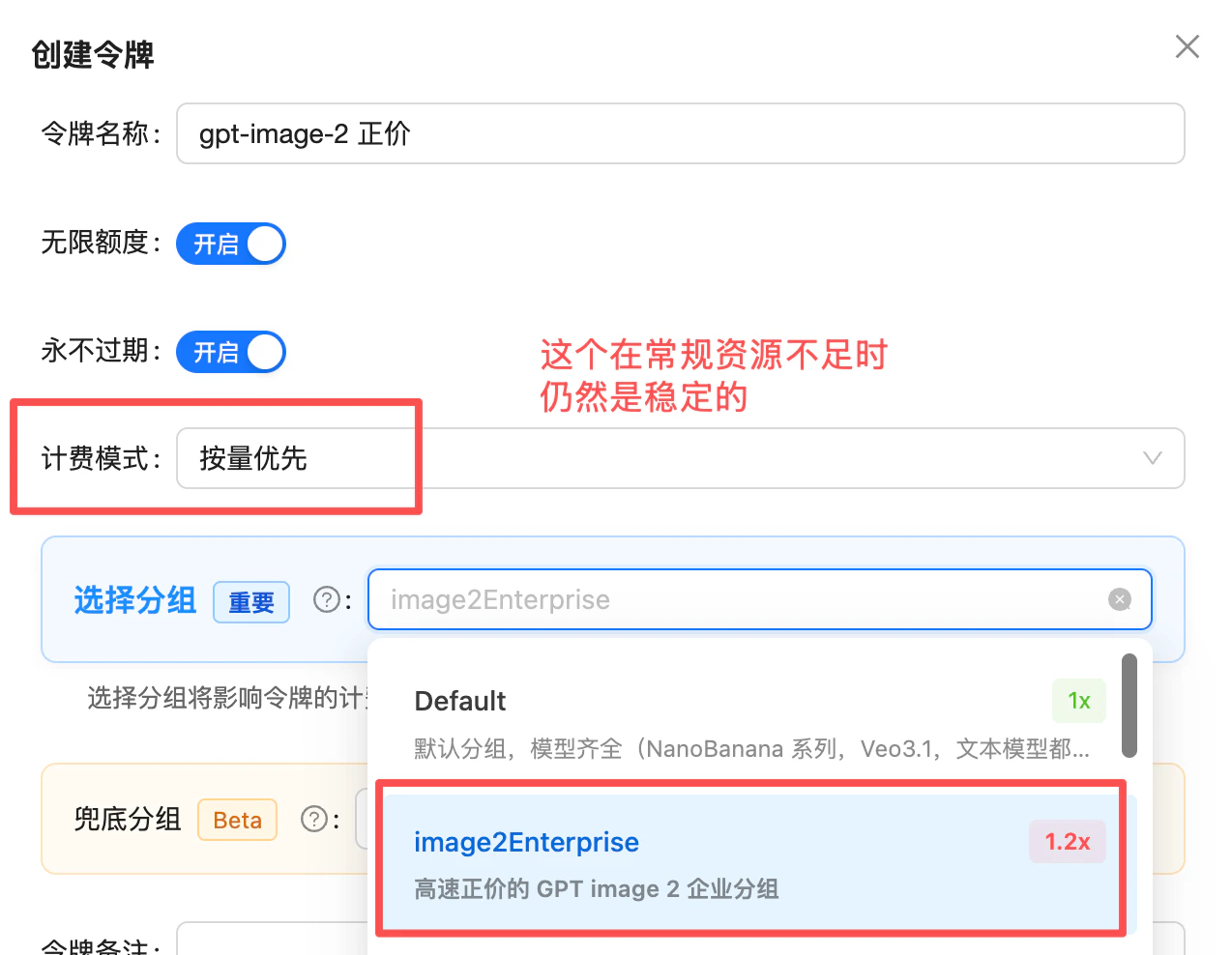 📖 Stability check (recent call log): [/en/live/2026-04/image2-enterprise-stable](/en/live/2026-04/image2-enterprise-stable)
## Technical Specifications
| Dimension | Value |
| - | - |
| **Model name** | `gpt-image-2.5-flare` / `gpt-image-2.5-sunburst` / `gpt-image-2` (same parameters; see the Model Selection section above) |
| **Speed** | 1024² measured (2026-09-09): `gpt-image-2.5-flare` `low` 10 s / `high` 21 s / `max` 45 s; `gpt-image-2.5-sunburst` 14 / 42 / 142 s; `gpt-image-2` `low` 21 s / `high` 224 s. High quality + 2K/4K takes longer |
| **Output resolution** | Any valid size (1K/2K/4K, max 3840×2160) |
| **Quality tiers** | `auto` / `low` / `medium` / `high` / `xhigh` / `max` (`xhigh` / `max` accepted by the two 2.5 models only) |
| **Output formats** | `png` (default) / `jpeg` / `webp` |
| **Chinese prompts** | ✅ Native |
| **Prompt limit** | 32,000 characters (provider limit, counted in characters), see [Long Prompts](/en/api-capabilities/image-long-prompt) |
| **Per call** | 1 image (`n=1`) |
| **Reference image limit** | 16 (`image[]`) |
| **Per-image size limit** | multipart file: under 50MB each (png/jpg/webp); base64 data URL: \~20MiB field limit, keep originals within 15MB |
| **Mask inpainting** | ✅ Supported (alpha channel required, PNG under 4MB) |
| **Transparent background** | ✅ Supported (`background: "transparent"` with `png` / `webp`; `jpeg` has no alpha channel and is mutually exclusive with transparency; keep scenes out of the prompt or the parameter cannot override them) |
| **Response field** | `b64_json` (**raw base64, no prefix**); **`response_format` is not accepted** — passing it returns 400 |
## Endpoints
| Endpoint | Purpose | Content-Type |
| - | - | - |
| `POST /v1/images/generations` | Text-to-image | `application/json` |
| `POST /v1/images/edits` | Reference editing / multi-image fusion / mask inpainting | `multipart/form-data` |
**Domain selection**: `api.apiyi.com` is the primary domain. Other gateway domains like `b.apiyi.com` work identically.
## Size Reference
### Preset Sizes
| size | Meaning | Pixels |
| - | - | - |
| `auto` | Adaptive (default) | Model decides |
| `1024x1024` | Square 1:1 | 1K |
| `1536x1024` | Landscape 3:2 | 1K |
| `1024x1536` | Portrait 2:3 | 1K |
| `2048x2048` | Square 1:1 | 2K |
| `2048x1152` | Landscape 16:9 | 2K |
| `3840x2160` | Landscape 16:9 | 4K |
| `2160x3840` | Portrait 9:16 | 4K |
### Custom Size Constraints
`gpt-image-2` accepts **any valid size** that satisfies all of:
1. **Max edge ≤ 3840px**
2. **Both edges are multiples of 16**
3. **Aspect ratio ≤ 3:1**
4. **Total pixels ∈ \[655,360, 8,294,400]** (\~0.65MP to \~8.3MP)
**Valid examples**: `1600x1200`, `1792x1024`, `2048x1536`, `3200x1800`
**Invalid examples**: `1000x1000` (not multiple of 16), `4000x4000` (over max), `3840x1000` (ratio > 3:1)
Outputs above `2560×1440` (\~3.69MP) are officially marked **experimental** and may show quality fluctuations. For production, prefer presets like `2048x1152` / `2048x2048` / `3840x2160`.
## Quality Reference
### Available tiers
| quality | Meaning | Notes |
| - | - | - |
| `auto` | Automatic (**default**) | The value used when `quality` is omitted — the model picks a tier for you |
| `low` | Low quality | Fastest and cheapest — good for drafts / batch |
| `medium` | Medium quality | Balanced choice for everyday / final output |
| `high` | High quality | Text, fine textures, print; the top tier for `gpt-image-2` |
| `xhigh` | Extra-high quality (**new in 2.5**) | Accepted by `gpt-image-2.5-flare` / `sunburst` only; more output tokens than `high` |
| `max` | Maximum quality (**new in 2.5**) | Accepted by the two 2.5 models only; highest cost and latency, for production-grade finals |
**The default is `auto`, not `medium`.** Omitting `quality` is equivalent to passing `"quality": "auto"` — the model auto-selects a quality tier, and **OpenAI does not guarantee it maps to `medium`**. The tier `auto` resolves to is unpredictable and directly affects cost, latency, and billing stability. **When you need cost control and predictability, pass `low` / `medium` / `high` / `xhigh` / `max` explicitly instead of relying on `auto`.**
**Do not pass the legacy DALL·E values `standard` / `hd`.** `quality` only accepts the six official enum values `low` / `medium` / `high` / `xhigh` / `max` / `auto`, and `xhigh` / `max` are accepted by the two 2.5 models only. The legacy DALL·E 3 values `standard` / `hd` behave inconsistently across backend channels: sometimes they fail immediately with a 400 (`invalid_value`), and sometimes they are silently ignored and the request runs at `auto` (unpredictable cost). Always pass one of the official values explicitly.
**`quality` has the largest impact on price — more than `size`.** Output image token count is driven by `quality × size`, but `quality` carries far more weight: at the same size, going from `low` to `high` can change per-image cost by **30×+** (see the "per-image cost" table above: gpt-image-2 at 1024×1024 ranges from `low` \$0.006 to `high` \$0.211; the 2.5 models range from `low` \$0.006 to `max` \$0.211). Estimate cost by `quality` first, then layer in the effect of `size`.
## Best Practices
**Onboarding tip: get the API working with `low` first, then scale up**
We've seen new integrators jump straight to `quality=high` + high resolution and end up waiting **≈ 235 seconds (\~4 minutes) per image** — only to suspect the API was stuck. `high` mode has the highest inference complexity, and 4K can stretch close to 5 minutes. **Before going to production, integrate end-to-end with `quality=low` first** (auth, SDK, params, timeouts, error handling), then move up to `medium` / `high` only as your real quality requirement demands.
For new integrations, **start with `quality=low` + a preset size** to validate the full call chain (auth, params, timeouts, error handling). `low` is several times faster than `high`, so functional issues surface quickly without being masked by long latency.
The 8 official presets are tuned for stable speed and quality. Reserve custom sizes for genuinely unusual aspect ratios.
Drafts / batch → `low`; daily / final → `medium`; text, fine textures, print → `high`. **Note that `low` ↔ `high` is more than visual fidelity — it's also a step change in inference complexity**, so latency scales accordingly.
For final display, `output_format=jpeg` + `output_compression=85` is faster than PNG and roughly half the size.
Text rendering is a key strength but lower tiers can still blur. Lock `quality=high` for signage and poster scenarios.
Each image up to 50MB (compress to within 1.5MB in practice); PNG/JPEG/WebP supported; up to 16 images; reference order with "image 1 / image 2" in the prompt.
`background: "transparent"` with `png` / `webp` only guarantees an alpha channel. **If the prompt or the reference image describes a full scene (a forest, a room, a street), the model paints that scene** and the parameter will not stop it — this is the main reason transparency "sometimes works", and it has nothing to do with `quality` (measured 2026-09-11: subject-only prompts 16/16 transparent, scene prompts 0/3, medium and high alike). End the prompt with `isolated subject on a transparent background, no scenery, no ground`; when the reference image has a background, say `remove the background entirely, keep only the subject` in the edit prompt. See the [transparent background FAQ](/en/faq/image-transparent-background).
The two parameters that dominate latency are **`quality`** and **`size`** — especially `quality`. Configure client timeouts per tier:
| quality | Recommended client timeout | Observed latency |
| - | - | - |
| `low` | ≥ **120 seconds** | typically 10–40 seconds |
| `medium` | ≥ **240 seconds** | typically 30–90 seconds |
| `high` | ≥ **600 seconds** (safety net) | gpt-image-2 2K/4K runs 3–5 minutes, long tail observed at 235+ seconds; the 2.5 models measured 21–42 s at 1024² |
| `xhigh` (2.5 only) | ≥ **300 seconds** | 1024² measured 31–60 s (2026-09-09); longer at 2K/4K |
| `max` (2.5 only) | ≥ **600 seconds** (safety net) | 1024² measured 45–142 s; same token count as gpt-image-2 `high`, so budget 2K/4K like gpt-image-2 `high` |
**For `high` mode, set 600s as the safety-net timeout** to absorb queueing, long-tail variance, and upstream jitter. Show progress in the UI; consider a task queue server-side.
Migrating from `gpt-image-1.5`: drop `input_fidelity` (forced high-fidelity, will error if passed); `background: transparent` keeps working as-is, no change needed. Migrating from legacy DALL·E 2/3 code: **drop `response_format`** (GPT Image models reject it with 400 `Unknown parameter: 'response_format'`; output is always `b64_json`).
## Errors & Retries
| Status | Meaning | Suggested action |
| - | - | - |
| `400` | Invalid parameters (size constraint violation, unsupported field, etc.) | Validate against size constraints; **do not pass** `response_format` / `input_fidelity`; `background: transparent` combined with `output_format: jpeg` also returns 400 (jpeg has no alpha channel) — use `png` / `webp` instead; on `Unknown parameter: 'response_format'`, simply remove that parameter — see [FAQ](#faq); `invalid_image_file` on the edit endpoint is usually an MPO phone photo — see [FAQ](#faq) |
| `413` | Request body too large (multi-image edits / oversized PNGs; observed from roughly 80MB request bodies upward, and not on every call of that size) | The body reads `message: openai_error, code: bad_response_status_code`; it comes from the provider-side chain and the gateway does not retry it. Compress reference images to under 10MB each and under 50MB in total (the provider's per-image limit is 50MB) — this also cuts upload waits from minutes to seconds |
| `401` | Invalid token | Check Bearer Token |
| `400` + `safety_violations=[...]` | Content moderation block (observed status is 400, not 403) | Usually happens after the image is rendered, so the same prompt passes sometimes and fails sometimes; `moderation: low` only affects prompt-side moderation. Add explicit clothing for the character first, then change one word at a time. See [Safety Rejections](/en/api-capabilities/image-safety-troubleshooting) |
| `429` | Rate limit / insufficient balance | Exponential backoff |
| `5xx` | Gateway / backend error | Retry 1–2 times |
| Timeout | Long tail | Tier client timeout by `quality`: `low` ≥ **120s** / `medium` ≥ **240s** / `high` ≥ **600s** (high + 2K/4K runs 3–5 minutes; long tail observed at 235+ seconds) |
**Client recommendations**:
* Tier request timeout by `quality`: `low` ≥ **120 seconds** / `medium` ≥ **240 seconds** / **`high` ≥ 600 seconds** (safety net — observed 3–5 minutes; configuring around 120s/360s causes many false timeouts)
* **Integrate with `quality=low` first**, then move up to `medium` / `high` as real quality needs demand
* Exponential backoff for 5xx and timeouts (suggest 2 retries)
* Log `x-request-id` header for support
## FAQ
**Remove the `response_format` parameter — this is currently the most common 400 error.** `gpt-image-2` (and the entire GPT Image series) **does not accept** `response_format`: the output format is fixed to `b64_json` and cannot be changed. Passing it returns:
```json theme={null}
{
"error": {
"message": "Unknown parameter: 'response_format'.",
"type": "invalid_request_error",
"param": "response_format",
"code": "unknown_parameter"
}
}
```
This parameter is a **legacy of the DALL·E 2/3 era** (which offered `url` / `b64_json`), and plenty of old sample code and some third-party libraries still include it by default. When migrating to `gpt-image-2`, delete the field and read `data[0].b64_json` directly (raw base64 — decode it to get the image file). The error is returned at the input-validation stage and is **not billed**.
If your workflow genuinely needs an **image URL** instead of base64:
* Official `gpt-image-2` has no URL output — decode the base64 and upload to your own object storage
* Or switch to the reverse-engineered [`gpt-image-2-all`](/en/api-capabilities/gpt-image-2-all/overview), which supports `response_format: "url"` and returns a CDN link valid for 24 hours
**Yes**. `gpt-image-2` returns a **raw base64 string** (no prefix), unlike `gpt-image-2-all`. Two client patterns:
* **Write file**: `base64.b64decode(b64_str)` → write to disk
* **Browser render**: `img.src = 'data:image/png;base64,' + b64_str` (prepend manually)
If your code assumes the 1.5-era "already prefixed" behavior, you'll get a corrupted data URL — handle this explicitly.
`gpt-image-2` **forces** high-fidelity processing of reference images and no longer accepts `input_fidelity`. When migrating from 1.5, just remove this field — no replacement needed.
Just pass `background: "transparent"` with `output_format` set to `png` or `webp`. What comes back is a real alpha-channel image — no cutout post-processing needed. Both text-to-image and image editing support it.
Two boundaries: `jpeg` has no alpha channel and is mutually exclusive with transparency (returns 400); and on the edit endpoint transparency is a **re-draw**, not a precise trace of the original outline, so subject detail will shift. For pixel-exact extraction, run `rembg` / `PIL` / `sharp` yourself.
The third boundary is the one people miss: **if the prompt or the reference image describes a scene, the model paints the scene** — the parameter cannot override it, and raising `quality` does not help. Describe the subject only and end with `isolated subject on a transparent background, no scenery, no ground`.
Full details and per-model support: [How do I generate images with a transparent background](/en/faq/image-transparent-background).
1 image (`n=1`). For N images, issue N parallel requests. Each is independently token-billed.
Higher resolution and higher quality require more output image tokens, which naturally takes longer. **We've seen `quality=high` + high resolution take ≈ 235 seconds (\~4 minutes) per image** in real customer integrations, and `3840×2160` + `high` long-tail can stretch close to 5 minutes. Recommendations:
* **Integrate with `quality=low` first** to validate the call chain, then move up as real quality needs demand
* Tier client timeout by quality: `low` ≥ **120s** / `medium` ≥ **240s** / **`high` ≥ 600s** (safety net)
* Show "generating" progress in the UI
* Use 1024×1024 / 1536×1024 1K presets when 4K isn't needed
**It's configured, but don't build cache discounts into your cost budget.** The official cached-input rates are text \$1.25 / image \$2.00 per 1M tokens, and the APIYI channel has caching configured — when a request hits the cache, you're billed at the cached rate.
One honest caveat: to sustain high concurrency, APIYI spreads requests across multiple upstream OpenAI accounts (a single OpenAI Tier-5 account allows only 250 RPM). OpenAI's prompt cache doesn't carry across accounts, so under high concurrency, requests sharing the same prefix may not land on the same account — **the cache may simply not hit**.
The good news: the impact is small. The dominant cost in image generation is output image tokens (\$30 / 1M); the cache discount only applies to the input side, so it barely moves the per-image total. Budget at **full input price** and treat any cache hits as bonus savings.
Because `gpt-image-2` auto-enables high-fidelity processing of reference images, the references themselves convert to large input token counts via the Vision pricing rules. Edit input tokens are noticeably higher than text-to-image — budget accordingly.
**Root cause: `quality` was set to `auto` (or omitted).** We've had customers report "identical size, resolution, and reference images, yet the price swings up and down." On investigation, both `size` and `quality` were set to `auto`.
**The culprit is `quality: auto`**: in auto mode the model **interprets the request and picks a different quality tier on the fly** for each generation. A different tier means a different output image token count, which means a different price. Below are three real billing entries with **identical input (1061 input tokens each)** yet costs differing several-fold:
| Latency | Input tokens | Output tokens | Cost per call |
| - | - | - | - |
| 53s | 1061 | 1286 | \$0.055082 |
| 135s | 1061 | **5146** | **\$0.194042** |
| 68s | 1061 | 1287 | \$0.055118 |
In the second call, `auto` resolved to a higher quality tier, output tokens jumped to 5146, and the price rose to \~3.5×.
**Fix: don't let `quality` stay on `auto` — pass `low` / `medium` / `high` explicitly.** With a fixed tier, output token count and price for identical input become stable and predictable. See the "Quality Reference" section above.
The `gpt-image-2` image edit endpoint (`/v1/images/edits`) supports up to **16** reference images:
* **multipart/form-data file upload**: each image must be **under 50MB**, formats `png` / `jpg` / `webp`
* **base64 data URL**: the field length limit is about **20MiB** (schema `maxLength: 20971520` — a string-field limit, **not** the same as the 50MB multipart cap), so keep original images within **15MB**
* **mask file**: separately limited to **PNG under 4MB**
Practical advice: don't max out multiple large images at once — oversized request bodies tend to fail at the gateway / timeout layer. Compressing each image to **within 1.5MB** is the most reliable, and output quality is unrelated to input file size.
This error (`code: invalid_image_file`) means: **the Nth reference image is not a standard png / jpg / webp file** (1-indexed — use the index to locate the offending image).
The most common root cause is **MPO format** from phone cameras: `.jpg` files straight out of Huawei Mate-series phones embed an HDR gain-map sub-frame and are actually multi-frame JPEG containers (MPO). The header is the same `FFD8`, and both the extension and the `file` command report JPEG — impossible to spot by eye. Verified July 2026: MPO files are always rejected, and the same images re-encoded as standard JPEG/PNG succeed **at the full original resolution** (unrelated to dimensions, the `image[]` field name, or `quality`/`size` params). The error is returned at the input-validation stage and is **not billed**.
**Fix**: re-encode with Pillow before upload (if `Image.open(f).format` returns `"MPO"`, it needs conversion):
```python theme={null}
from PIL import Image
im = Image.open("photo.jpg")
im.load() # for MPO, keeps only the first frame
im.convert("RGB").save("photo_fixed.jpg", quality=92)
```
Full details and detection method: [Image Edit API — Reference Image Format Requirements and Preprocessing](/en/api-capabilities/gpt-image-2/image-edit#reference-image-format-requirements-and-preprocessing).
* **Same size** as the original, **PNG format**, **under 4MB**
* **Must have alpha channel**: transparent (alpha=0) = inpaint area, opaque = preserve
* Only applies to the first image
* Mask is a "soft guide" — the model may extend or contract around the masked region
| Pick | When |
| - | - |
| **gpt-image-2.5-flare / sunburst / gpt-image-2** (Official) | Need precise size/quality control, must match OpenAI official exactly, want 4K output, need mask inpainting; flare is the fastest of the three, sunburst the most precise editor |
| **gpt-image-2-all** (Reverse) | Want flat \$0.03/image, 30–60s render, minimal parameters, strong consistency / Chinese text |
Yes — zero code change. Point `base_url` to `https://api.apiyi.com/v1` and set `api_key` to your APIYI token:
```python theme={null}
from openai import OpenAI
client = OpenAI(api_key="sk-your-key", base_url="https://api.apiyi.com/v1")
resp = client.images.generate(model="gpt-image-2.5-flare", prompt="...", size="2048x1152", quality="high")
```
**No**. `gpt-image-2` uses OpenAI's official synchronous endpoint — once a request is submitted, it runs to completion with no "cancel" signal. Even if the client disconnects, the server still finishes generation and bills normally. Configure client-side timeouts carefully — do not assume "disconnect = no charge".
Default **100 RPM** (100 requests per minute). Actual usable RPM is also dynamically adjusted by **overall platform concurrency**. If your workload needs more, contact us with your estimated QPS / RPM and we can provision additional capacity.
**No**. `gpt-image-2` strictly mirrors the OpenAI official API — synchronous only. The request blocks until the result is returned (`high` + 4K realistically 1–2 minutes). If you need an async queue or callback mechanism:
* Wrap it yourself with a task queue (Celery / BullMQ, etc.) at the business layer
* Or use [`gpt-image-2-all`](/en/api-capabilities/gpt-image-2-all/overview) — generates in 30–60s, easier to poll from the front end
Yes: **32,000 characters**, the OpenAI Images API provider limit, counted in characters not tokens; APIYI's official relay does not tighten it. The web app only looks unlimited because the chat model reads what you paste and then writes its own short prompt for the image tool, so the image model never sees the material. For long material such as brand books or packaging specs, distill it with a text model into a 1K to 3K character structured prompt first, see [Long Prompts](/en/api-capabilities/image-long-prompt).
Most of these blocks happen **after the image is rendered**: the image is generated, then rejected by an output-side classifier, so a failed call takes as long as a successful one and the same prompt passes sometimes and fails sometimes. `moderation: low` only lowers prompt-side moderation and does not help here. The most common cause is a character described by mood but not by clothing, so the model improvises and crosses the line: **add one explicit clothing phrase first** (leave everything else untouched), and only then ablate one word at a time. Full case and the 20-call log: [Safety Rejections](/en/api-capabilities/image-safety-troubleshooting).
**No**. OpenAI's built-in content moderation rejects unsafe / malformed requests with a `400` error, and **no charge is incurred**. Typical response:
```json theme={null}
{
"status_code": 400,
"error": {
"message": "Your request was rejected by the safety system. ...",
"type": "shell_api_error",
"code": "moderation_blocked"
}
}
```
Other zero-cost errors: `401` (invalid token), `429` (rate limit). **Token billing only kicks in once the request actually reaches the model generation stage (i.e., `200` + `b64_json` received).**
## Related Docs
* [⚖️ Official vs Reverse Comparison](/en/api-capabilities/gpt-image-2/vs-gpt-image-2-all) - Side-by-side selection guide
* [Text-to-Image Playground](/en/api-capabilities/gpt-image-2/text-to-image) - `/v1/images/generations` interactive testing
* [Image Edit Playground](/en/api-capabilities/gpt-image-2/image-edit) - `/v1/images/edits` multi-image fusion + mask
* [Deep Dive: GPT-image-2.5 Launches, Flare Is Faster, Sunburst Is Sharper](/en/news/gpt-image-2-5-launch) - News article
* [Deep Dive: gpt-image-2 Launch](/en/news/gpt-image-2-launch) - News article
* [Full Integration Doc](/en/api-capabilities/gpt-image-2/overview) - Complete API reference
* [GPT-Image-2-All (Reverse-Engineered)](/en/api-capabilities/gpt-image-2-all/overview) - Cheaper, faster alternative
* [Community: Luck GPT-Image 2 ComfyUI Nodes](/en/scenarios/ecosystem/luckgpt2-comfyui) - Call `gpt-image-2` / `gpt-image-2.5-flare` / `gpt-image-2.5-sunburst` directly in ComfyUI (mask / 16 reference images / six quality tiers / custom sizes)
* [Community: APIYI GPT-Image 2 Skills](/en/scenarios/ecosystem/apiyi-gpt-image-skills) - Invoke from Codex CLI / Cursor / Gemini CLI and other AI coding tools with one sentence
* [API Manual](/en/api-manual) - General usage guide
`gpt-image-2.5-flare` / `gpt-image-2.5-sunburst` / `gpt-image-2` are OpenAI's official models, billed by token. If you prioritize flat pricing (\$0.03/image) and faster generation (30–60s), see [gpt-image-2-all](/en/api-capabilities/gpt-image-2-all/overview).
This documentation is built and hosted on [Mintlify](https://mintlify.com), a developer documentation platform.
📖 Stability check (recent call log): [/en/live/2026-04/image2-enterprise-stable](/en/live/2026-04/image2-enterprise-stable)
## Technical Specifications
| Dimension | Value |
| - | - |
| **Model name** | `gpt-image-2.5-flare` / `gpt-image-2.5-sunburst` / `gpt-image-2` (same parameters; see the Model Selection section above) |
| **Speed** | 1024² measured (2026-09-09): `gpt-image-2.5-flare` `low` 10 s / `high` 21 s / `max` 45 s; `gpt-image-2.5-sunburst` 14 / 42 / 142 s; `gpt-image-2` `low` 21 s / `high` 224 s. High quality + 2K/4K takes longer |
| **Output resolution** | Any valid size (1K/2K/4K, max 3840×2160) |
| **Quality tiers** | `auto` / `low` / `medium` / `high` / `xhigh` / `max` (`xhigh` / `max` accepted by the two 2.5 models only) |
| **Output formats** | `png` (default) / `jpeg` / `webp` |
| **Chinese prompts** | ✅ Native |
| **Prompt limit** | 32,000 characters (provider limit, counted in characters), see [Long Prompts](/en/api-capabilities/image-long-prompt) |
| **Per call** | 1 image (`n=1`) |
| **Reference image limit** | 16 (`image[]`) |
| **Per-image size limit** | multipart file: under 50MB each (png/jpg/webp); base64 data URL: \~20MiB field limit, keep originals within 15MB |
| **Mask inpainting** | ✅ Supported (alpha channel required, PNG under 4MB) |
| **Transparent background** | ✅ Supported (`background: "transparent"` with `png` / `webp`; `jpeg` has no alpha channel and is mutually exclusive with transparency; keep scenes out of the prompt or the parameter cannot override them) |
| **Response field** | `b64_json` (**raw base64, no prefix**); **`response_format` is not accepted** — passing it returns 400 |
## Endpoints
| Endpoint | Purpose | Content-Type |
| - | - | - |
| `POST /v1/images/generations` | Text-to-image | `application/json` |
| `POST /v1/images/edits` | Reference editing / multi-image fusion / mask inpainting | `multipart/form-data` |
**Domain selection**: `api.apiyi.com` is the primary domain. Other gateway domains like `b.apiyi.com` work identically.
## Size Reference
### Preset Sizes
| size | Meaning | Pixels |
| - | - | - |
| `auto` | Adaptive (default) | Model decides |
| `1024x1024` | Square 1:1 | 1K |
| `1536x1024` | Landscape 3:2 | 1K |
| `1024x1536` | Portrait 2:3 | 1K |
| `2048x2048` | Square 1:1 | 2K |
| `2048x1152` | Landscape 16:9 | 2K |
| `3840x2160` | Landscape 16:9 | 4K |
| `2160x3840` | Portrait 9:16 | 4K |
### Custom Size Constraints
`gpt-image-2` accepts **any valid size** that satisfies all of:
1. **Max edge ≤ 3840px**
2. **Both edges are multiples of 16**
3. **Aspect ratio ≤ 3:1**
4. **Total pixels ∈ \[655,360, 8,294,400]** (\~0.65MP to \~8.3MP)
**Valid examples**: `1600x1200`, `1792x1024`, `2048x1536`, `3200x1800`
**Invalid examples**: `1000x1000` (not multiple of 16), `4000x4000` (over max), `3840x1000` (ratio > 3:1)
Outputs above `2560×1440` (\~3.69MP) are officially marked **experimental** and may show quality fluctuations. For production, prefer presets like `2048x1152` / `2048x2048` / `3840x2160`.
## Quality Reference
### Available tiers
| quality | Meaning | Notes |
| - | - | - |
| `auto` | Automatic (**default**) | The value used when `quality` is omitted — the model picks a tier for you |
| `low` | Low quality | Fastest and cheapest — good for drafts / batch |
| `medium` | Medium quality | Balanced choice for everyday / final output |
| `high` | High quality | Text, fine textures, print; the top tier for `gpt-image-2` |
| `xhigh` | Extra-high quality (**new in 2.5**) | Accepted by `gpt-image-2.5-flare` / `sunburst` only; more output tokens than `high` |
| `max` | Maximum quality (**new in 2.5**) | Accepted by the two 2.5 models only; highest cost and latency, for production-grade finals |
**The default is `auto`, not `medium`.** Omitting `quality` is equivalent to passing `"quality": "auto"` — the model auto-selects a quality tier, and **OpenAI does not guarantee it maps to `medium`**. The tier `auto` resolves to is unpredictable and directly affects cost, latency, and billing stability. **When you need cost control and predictability, pass `low` / `medium` / `high` / `xhigh` / `max` explicitly instead of relying on `auto`.**
**Do not pass the legacy DALL·E values `standard` / `hd`.** `quality` only accepts the six official enum values `low` / `medium` / `high` / `xhigh` / `max` / `auto`, and `xhigh` / `max` are accepted by the two 2.5 models only. The legacy DALL·E 3 values `standard` / `hd` behave inconsistently across backend channels: sometimes they fail immediately with a 400 (`invalid_value`), and sometimes they are silently ignored and the request runs at `auto` (unpredictable cost). Always pass one of the official values explicitly.
**`quality` has the largest impact on price — more than `size`.** Output image token count is driven by `quality × size`, but `quality` carries far more weight: at the same size, going from `low` to `high` can change per-image cost by **30×+** (see the "per-image cost" table above: gpt-image-2 at 1024×1024 ranges from `low` \$0.006 to `high` \$0.211; the 2.5 models range from `low` \$0.006 to `max` \$0.211). Estimate cost by `quality` first, then layer in the effect of `size`.
## Best Practices
**Onboarding tip: get the API working with `low` first, then scale up**
We've seen new integrators jump straight to `quality=high` + high resolution and end up waiting **≈ 235 seconds (\~4 minutes) per image** — only to suspect the API was stuck. `high` mode has the highest inference complexity, and 4K can stretch close to 5 minutes. **Before going to production, integrate end-to-end with `quality=low` first** (auth, SDK, params, timeouts, error handling), then move up to `medium` / `high` only as your real quality requirement demands.
For new integrations, **start with `quality=low` + a preset size** to validate the full call chain (auth, params, timeouts, error handling). `low` is several times faster than `high`, so functional issues surface quickly without being masked by long latency.
The 8 official presets are tuned for stable speed and quality. Reserve custom sizes for genuinely unusual aspect ratios.
Drafts / batch → `low`; daily / final → `medium`; text, fine textures, print → `high`. **Note that `low` ↔ `high` is more than visual fidelity — it's also a step change in inference complexity**, so latency scales accordingly.
For final display, `output_format=jpeg` + `output_compression=85` is faster than PNG and roughly half the size.
Text rendering is a key strength but lower tiers can still blur. Lock `quality=high` for signage and poster scenarios.
Each image up to 50MB (compress to within 1.5MB in practice); PNG/JPEG/WebP supported; up to 16 images; reference order with "image 1 / image 2" in the prompt.
`background: "transparent"` with `png` / `webp` only guarantees an alpha channel. **If the prompt or the reference image describes a full scene (a forest, a room, a street), the model paints that scene** and the parameter will not stop it — this is the main reason transparency "sometimes works", and it has nothing to do with `quality` (measured 2026-09-11: subject-only prompts 16/16 transparent, scene prompts 0/3, medium and high alike). End the prompt with `isolated subject on a transparent background, no scenery, no ground`; when the reference image has a background, say `remove the background entirely, keep only the subject` in the edit prompt. See the [transparent background FAQ](/en/faq/image-transparent-background).
The two parameters that dominate latency are **`quality`** and **`size`** — especially `quality`. Configure client timeouts per tier:
| quality | Recommended client timeout | Observed latency |
| - | - | - |
| `low` | ≥ **120 seconds** | typically 10–40 seconds |
| `medium` | ≥ **240 seconds** | typically 30–90 seconds |
| `high` | ≥ **600 seconds** (safety net) | gpt-image-2 2K/4K runs 3–5 minutes, long tail observed at 235+ seconds; the 2.5 models measured 21–42 s at 1024² |
| `xhigh` (2.5 only) | ≥ **300 seconds** | 1024² measured 31–60 s (2026-09-09); longer at 2K/4K |
| `max` (2.5 only) | ≥ **600 seconds** (safety net) | 1024² measured 45–142 s; same token count as gpt-image-2 `high`, so budget 2K/4K like gpt-image-2 `high` |
**For `high` mode, set 600s as the safety-net timeout** to absorb queueing, long-tail variance, and upstream jitter. Show progress in the UI; consider a task queue server-side.
Migrating from `gpt-image-1.5`: drop `input_fidelity` (forced high-fidelity, will error if passed); `background: transparent` keeps working as-is, no change needed. Migrating from legacy DALL·E 2/3 code: **drop `response_format`** (GPT Image models reject it with 400 `Unknown parameter: 'response_format'`; output is always `b64_json`).
## Errors & Retries
| Status | Meaning | Suggested action |
| - | - | - |
| `400` | Invalid parameters (size constraint violation, unsupported field, etc.) | Validate against size constraints; **do not pass** `response_format` / `input_fidelity`; `background: transparent` combined with `output_format: jpeg` also returns 400 (jpeg has no alpha channel) — use `png` / `webp` instead; on `Unknown parameter: 'response_format'`, simply remove that parameter — see [FAQ](#faq); `invalid_image_file` on the edit endpoint is usually an MPO phone photo — see [FAQ](#faq) |
| `413` | Request body too large (multi-image edits / oversized PNGs; observed from roughly 80MB request bodies upward, and not on every call of that size) | The body reads `message: openai_error, code: bad_response_status_code`; it comes from the provider-side chain and the gateway does not retry it. Compress reference images to under 10MB each and under 50MB in total (the provider's per-image limit is 50MB) — this also cuts upload waits from minutes to seconds |
| `401` | Invalid token | Check Bearer Token |
| `400` + `safety_violations=[...]` | Content moderation block (observed status is 400, not 403) | Usually happens after the image is rendered, so the same prompt passes sometimes and fails sometimes; `moderation: low` only affects prompt-side moderation. Add explicit clothing for the character first, then change one word at a time. See [Safety Rejections](/en/api-capabilities/image-safety-troubleshooting) |
| `429` | Rate limit / insufficient balance | Exponential backoff |
| `5xx` | Gateway / backend error | Retry 1–2 times |
| Timeout | Long tail | Tier client timeout by `quality`: `low` ≥ **120s** / `medium` ≥ **240s** / `high` ≥ **600s** (high + 2K/4K runs 3–5 minutes; long tail observed at 235+ seconds) |
**Client recommendations**:
* Tier request timeout by `quality`: `low` ≥ **120 seconds** / `medium` ≥ **240 seconds** / **`high` ≥ 600 seconds** (safety net — observed 3–5 minutes; configuring around 120s/360s causes many false timeouts)
* **Integrate with `quality=low` first**, then move up to `medium` / `high` as real quality needs demand
* Exponential backoff for 5xx and timeouts (suggest 2 retries)
* Log `x-request-id` header for support
## FAQ
**Remove the `response_format` parameter — this is currently the most common 400 error.** `gpt-image-2` (and the entire GPT Image series) **does not accept** `response_format`: the output format is fixed to `b64_json` and cannot be changed. Passing it returns:
```json theme={null}
{
"error": {
"message": "Unknown parameter: 'response_format'.",
"type": "invalid_request_error",
"param": "response_format",
"code": "unknown_parameter"
}
}
```
This parameter is a **legacy of the DALL·E 2/3 era** (which offered `url` / `b64_json`), and plenty of old sample code and some third-party libraries still include it by default. When migrating to `gpt-image-2`, delete the field and read `data[0].b64_json` directly (raw base64 — decode it to get the image file). The error is returned at the input-validation stage and is **not billed**.
If your workflow genuinely needs an **image URL** instead of base64:
* Official `gpt-image-2` has no URL output — decode the base64 and upload to your own object storage
* Or switch to the reverse-engineered [`gpt-image-2-all`](/en/api-capabilities/gpt-image-2-all/overview), which supports `response_format: "url"` and returns a CDN link valid for 24 hours
**Yes**. `gpt-image-2` returns a **raw base64 string** (no prefix), unlike `gpt-image-2-all`. Two client patterns:
* **Write file**: `base64.b64decode(b64_str)` → write to disk
* **Browser render**: `img.src = 'data:image/png;base64,' + b64_str` (prepend manually)
If your code assumes the 1.5-era "already prefixed" behavior, you'll get a corrupted data URL — handle this explicitly.
`gpt-image-2` **forces** high-fidelity processing of reference images and no longer accepts `input_fidelity`. When migrating from 1.5, just remove this field — no replacement needed.
Just pass `background: "transparent"` with `output_format` set to `png` or `webp`. What comes back is a real alpha-channel image — no cutout post-processing needed. Both text-to-image and image editing support it.
Two boundaries: `jpeg` has no alpha channel and is mutually exclusive with transparency (returns 400); and on the edit endpoint transparency is a **re-draw**, not a precise trace of the original outline, so subject detail will shift. For pixel-exact extraction, run `rembg` / `PIL` / `sharp` yourself.
The third boundary is the one people miss: **if the prompt or the reference image describes a scene, the model paints the scene** — the parameter cannot override it, and raising `quality` does not help. Describe the subject only and end with `isolated subject on a transparent background, no scenery, no ground`.
Full details and per-model support: [How do I generate images with a transparent background](/en/faq/image-transparent-background).
1 image (`n=1`). For N images, issue N parallel requests. Each is independently token-billed.
Higher resolution and higher quality require more output image tokens, which naturally takes longer. **We've seen `quality=high` + high resolution take ≈ 235 seconds (\~4 minutes) per image** in real customer integrations, and `3840×2160` + `high` long-tail can stretch close to 5 minutes. Recommendations:
* **Integrate with `quality=low` first** to validate the call chain, then move up as real quality needs demand
* Tier client timeout by quality: `low` ≥ **120s** / `medium` ≥ **240s** / **`high` ≥ 600s** (safety net)
* Show "generating" progress in the UI
* Use 1024×1024 / 1536×1024 1K presets when 4K isn't needed
**It's configured, but don't build cache discounts into your cost budget.** The official cached-input rates are text \$1.25 / image \$2.00 per 1M tokens, and the APIYI channel has caching configured — when a request hits the cache, you're billed at the cached rate.
One honest caveat: to sustain high concurrency, APIYI spreads requests across multiple upstream OpenAI accounts (a single OpenAI Tier-5 account allows only 250 RPM). OpenAI's prompt cache doesn't carry across accounts, so under high concurrency, requests sharing the same prefix may not land on the same account — **the cache may simply not hit**.
The good news: the impact is small. The dominant cost in image generation is output image tokens (\$30 / 1M); the cache discount only applies to the input side, so it barely moves the per-image total. Budget at **full input price** and treat any cache hits as bonus savings.
Because `gpt-image-2` auto-enables high-fidelity processing of reference images, the references themselves convert to large input token counts via the Vision pricing rules. Edit input tokens are noticeably higher than text-to-image — budget accordingly.
**Root cause: `quality` was set to `auto` (or omitted).** We've had customers report "identical size, resolution, and reference images, yet the price swings up and down." On investigation, both `size` and `quality` were set to `auto`.
**The culprit is `quality: auto`**: in auto mode the model **interprets the request and picks a different quality tier on the fly** for each generation. A different tier means a different output image token count, which means a different price. Below are three real billing entries with **identical input (1061 input tokens each)** yet costs differing several-fold:
| Latency | Input tokens | Output tokens | Cost per call |
| - | - | - | - |
| 53s | 1061 | 1286 | \$0.055082 |
| 135s | 1061 | **5146** | **\$0.194042** |
| 68s | 1061 | 1287 | \$0.055118 |
In the second call, `auto` resolved to a higher quality tier, output tokens jumped to 5146, and the price rose to \~3.5×.
**Fix: don't let `quality` stay on `auto` — pass `low` / `medium` / `high` explicitly.** With a fixed tier, output token count and price for identical input become stable and predictable. See the "Quality Reference" section above.
The `gpt-image-2` image edit endpoint (`/v1/images/edits`) supports up to **16** reference images:
* **multipart/form-data file upload**: each image must be **under 50MB**, formats `png` / `jpg` / `webp`
* **base64 data URL**: the field length limit is about **20MiB** (schema `maxLength: 20971520` — a string-field limit, **not** the same as the 50MB multipart cap), so keep original images within **15MB**
* **mask file**: separately limited to **PNG under 4MB**
Practical advice: don't max out multiple large images at once — oversized request bodies tend to fail at the gateway / timeout layer. Compressing each image to **within 1.5MB** is the most reliable, and output quality is unrelated to input file size.
This error (`code: invalid_image_file`) means: **the Nth reference image is not a standard png / jpg / webp file** (1-indexed — use the index to locate the offending image).
The most common root cause is **MPO format** from phone cameras: `.jpg` files straight out of Huawei Mate-series phones embed an HDR gain-map sub-frame and are actually multi-frame JPEG containers (MPO). The header is the same `FFD8`, and both the extension and the `file` command report JPEG — impossible to spot by eye. Verified July 2026: MPO files are always rejected, and the same images re-encoded as standard JPEG/PNG succeed **at the full original resolution** (unrelated to dimensions, the `image[]` field name, or `quality`/`size` params). The error is returned at the input-validation stage and is **not billed**.
**Fix**: re-encode with Pillow before upload (if `Image.open(f).format` returns `"MPO"`, it needs conversion):
```python theme={null}
from PIL import Image
im = Image.open("photo.jpg")
im.load() # for MPO, keeps only the first frame
im.convert("RGB").save("photo_fixed.jpg", quality=92)
```
Full details and detection method: [Image Edit API — Reference Image Format Requirements and Preprocessing](/en/api-capabilities/gpt-image-2/image-edit#reference-image-format-requirements-and-preprocessing).
* **Same size** as the original, **PNG format**, **under 4MB**
* **Must have alpha channel**: transparent (alpha=0) = inpaint area, opaque = preserve
* Only applies to the first image
* Mask is a "soft guide" — the model may extend or contract around the masked region
| Pick | When |
| - | - |
| **gpt-image-2.5-flare / sunburst / gpt-image-2** (Official) | Need precise size/quality control, must match OpenAI official exactly, want 4K output, need mask inpainting; flare is the fastest of the three, sunburst the most precise editor |
| **gpt-image-2-all** (Reverse) | Want flat \$0.03/image, 30–60s render, minimal parameters, strong consistency / Chinese text |
Yes — zero code change. Point `base_url` to `https://api.apiyi.com/v1` and set `api_key` to your APIYI token:
```python theme={null}
from openai import OpenAI
client = OpenAI(api_key="sk-your-key", base_url="https://api.apiyi.com/v1")
resp = client.images.generate(model="gpt-image-2.5-flare", prompt="...", size="2048x1152", quality="high")
```
**No**. `gpt-image-2` uses OpenAI's official synchronous endpoint — once a request is submitted, it runs to completion with no "cancel" signal. Even if the client disconnects, the server still finishes generation and bills normally. Configure client-side timeouts carefully — do not assume "disconnect = no charge".
Default **100 RPM** (100 requests per minute). Actual usable RPM is also dynamically adjusted by **overall platform concurrency**. If your workload needs more, contact us with your estimated QPS / RPM and we can provision additional capacity.
**No**. `gpt-image-2` strictly mirrors the OpenAI official API — synchronous only. The request blocks until the result is returned (`high` + 4K realistically 1–2 minutes). If you need an async queue or callback mechanism:
* Wrap it yourself with a task queue (Celery / BullMQ, etc.) at the business layer
* Or use [`gpt-image-2-all`](/en/api-capabilities/gpt-image-2-all/overview) — generates in 30–60s, easier to poll from the front end
Yes: **32,000 characters**, the OpenAI Images API provider limit, counted in characters not tokens; APIYI's official relay does not tighten it. The web app only looks unlimited because the chat model reads what you paste and then writes its own short prompt for the image tool, so the image model never sees the material. For long material such as brand books or packaging specs, distill it with a text model into a 1K to 3K character structured prompt first, see [Long Prompts](/en/api-capabilities/image-long-prompt).
Most of these blocks happen **after the image is rendered**: the image is generated, then rejected by an output-side classifier, so a failed call takes as long as a successful one and the same prompt passes sometimes and fails sometimes. `moderation: low` only lowers prompt-side moderation and does not help here. The most common cause is a character described by mood but not by clothing, so the model improvises and crosses the line: **add one explicit clothing phrase first** (leave everything else untouched), and only then ablate one word at a time. Full case and the 20-call log: [Safety Rejections](/en/api-capabilities/image-safety-troubleshooting).
**No**. OpenAI's built-in content moderation rejects unsafe / malformed requests with a `400` error, and **no charge is incurred**. Typical response:
```json theme={null}
{
"status_code": 400,
"error": {
"message": "Your request was rejected by the safety system. ...",
"type": "shell_api_error",
"code": "moderation_blocked"
}
}
```
Other zero-cost errors: `401` (invalid token), `429` (rate limit). **Token billing only kicks in once the request actually reaches the model generation stage (i.e., `200` + `b64_json` received).**
## Related Docs
* [⚖️ Official vs Reverse Comparison](/en/api-capabilities/gpt-image-2/vs-gpt-image-2-all) - Side-by-side selection guide
* [Text-to-Image Playground](/en/api-capabilities/gpt-image-2/text-to-image) - `/v1/images/generations` interactive testing
* [Image Edit Playground](/en/api-capabilities/gpt-image-2/image-edit) - `/v1/images/edits` multi-image fusion + mask
* [Deep Dive: GPT-image-2.5 Launches, Flare Is Faster, Sunburst Is Sharper](/en/news/gpt-image-2-5-launch) - News article
* [Deep Dive: gpt-image-2 Launch](/en/news/gpt-image-2-launch) - News article
* [Full Integration Doc](/en/api-capabilities/gpt-image-2/overview) - Complete API reference
* [GPT-Image-2-All (Reverse-Engineered)](/en/api-capabilities/gpt-image-2-all/overview) - Cheaper, faster alternative
* [Community: Luck GPT-Image 2 ComfyUI Nodes](/en/scenarios/ecosystem/luckgpt2-comfyui) - Call `gpt-image-2` / `gpt-image-2.5-flare` / `gpt-image-2.5-sunburst` directly in ComfyUI (mask / 16 reference images / six quality tiers / custom sizes)
* [Community: APIYI GPT-Image 2 Skills](/en/scenarios/ecosystem/apiyi-gpt-image-skills) - Invoke from Codex CLI / Cursor / Gemini CLI and other AI coding tools with one sentence
* [API Manual](/en/api-manual) - General usage guide
`gpt-image-2.5-flare` / `gpt-image-2.5-sunburst` / `gpt-image-2` are OpenAI's official models, billed by token. If you prioritize flat pricing (\$0.03/image) and faster generation (30–60s), see [gpt-image-2-all](/en/api-capabilities/gpt-image-2-all/overview).
This documentation is built and hosted on [Mintlify](https://mintlify.com), a developer documentation platform.