> ## Documentation Index
> Fetch the complete documentation index at: https://docs.apiyi.com/llms.txt
> Use this file to discover all available pages before exploring further.
# Token Management API
> Create, list, disable, and delete API keys programmatically, with batch issuance and per-key limits on quota, models, and expiry
## API Overview
The Token Management API lets you handle the full lifecycle of your API keys in code, instead of
clicking through the console one key at a time.
The most common use case is **batch issuance**: giving each team member, downstream customer, or
project its own key, each with its own limits on **how much it can spend**, **which models it can
call**, and **how long it stays valid**.
`remain_quota` caps how much this key can spend in total
`models` sets an allowlist; calls to anything outside it are rejected
`expired_time` sets an expiry timestamp, after which the key stops working
If you only need one or two keys, the console is faster — see
[How to create an API key](/en/faq/token-management). This API is aimed at automated issuance,
scheduled rotation, or integrating key management into your own systems.
## How to Get Your System Token
The Token Management API authenticates with a **System Token**, which is not the same thing as
an API key.
Visit `api.apiyi.com/account/profile` to access your profile page
Locate the "Account Options - System Token" section at the bottom of the page
Enter your account password to receive an AccessToken that can be used for subsequent API queries
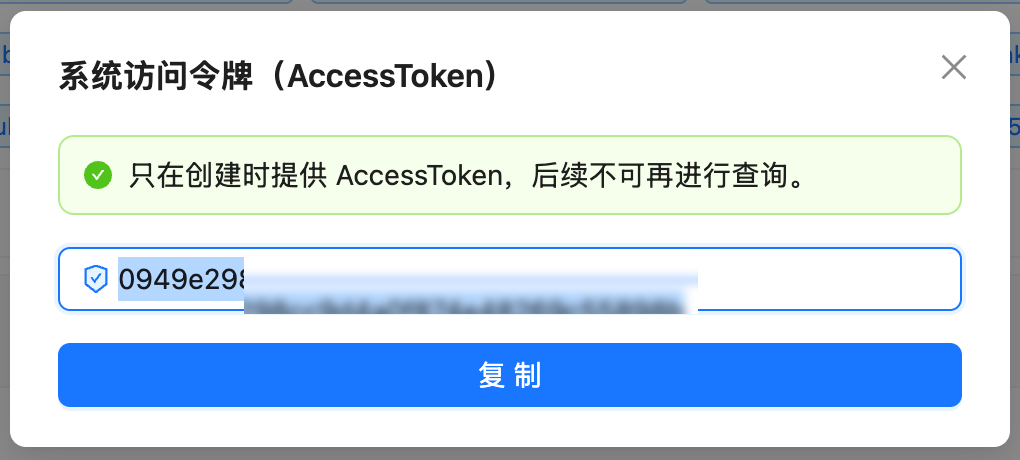 **A system token can create and delete API keys. Treat it like your account password.**
A system token cannot call models directly — using it against `/v1/chat/completions` is rejected —
but it can create API keys that can. **Leaking a system token is therefore considerably worse than
leaking a single API key.** Store it in a secret manager rather than in code, never commit it to a
repository, and rotate it periodically.
## Endpoints
All endpoints authenticate the same way: put the raw system token in the `Authorization` header,
**with no `Bearer` prefix**.
| Method | Path | Purpose |
| - | - | - |
| `GET` | `/api/token/?p=0&page_size=100` | List all tokens on your account |
| `GET` | `/api/token/{id}` | Retrieve a single token |
| `POST` | `/api/token/` | **Create a token**; the response returns the key in plain text |
| `PUT` | `/api/token/` | Update a token (requires the complete object) |
| `PUT` | `/api/token/?status_only=true` | Toggle enabled/disabled state only |
| `DELETE` | `/api/token/{id}` | Delete a token |
The base URL is `https://api.apiyi.com`.
## Creating a Token
### Request Example
```bash theme={null}
export APIYI_SYS_TOKEN='YOUR_SYSTEM_TOKEN'
curl --compressed -s -X POST 'https://api.apiyi.com/api/token/' \
-H "Authorization: $APIYI_SYS_TOKEN" \
-H 'Content-Type: application/json' \
-d '{
"name": "team-alice",
"remain_quota": 500000,
"unlimited_quota": false,
"group": "default",
"models": "gpt-5.6,deepseek-chat",
"expired_time": -1
}'
```
### Request Fields
| Field | Type | Description |
| - | - | - |
| `name` | String | Token name, for your own identification |
| `remain_quota` | Integer | Quota cap in credits; 500,000 = \$1.00 |
| `unlimited_quota` | Boolean | Whether quota is unlimited; **defaults to `false`** |
| `group` | String | The group identifier the token is bound to, e.g. `default` |
| `models` | String | **Model allowlist**, comma-separated; omit for no restriction |
| `expired_time` | Integer | Expiry timestamp in Unix seconds; `-1` means never expires |
**`unlimited_quota` defaults to `false` and `remain_quota` defaults to 0** — omitting both
produces a token with zero quota that cannot be used. Either set `remain_quota` explicitly or
set `unlimited_quota` to `true`.
**Use the `models` field for the model allowlist.**
The response structure also contains `model_limits`, `model_limits_enabled`, and `allow_ips`.
Passing these does not raise an error — the endpoint still returns 200 — but they **currently have
no effect**, and reading the token back shows them unset. Use `models` to restrict available
models. Source-IP restrictions need to be implemented on your own side for now.
### Response Example
```json theme={null}
{
"success": true,
"message": "",
"data": {
"id": 119431,
"user_id": 80778,
"key": "K1RPzapuXLfBU4kDC5D9C0E70b1841AeAa542186B2F54b75",
"status": 1,
"name": "team-alice",
"group": "default",
"models": "gpt-5.6,deepseek-chat",
"remain_quota": 500000,
"unlimited_quota": false,
"used_quota": 0,
"expired_time": -1,
"created_time": 1785599000
}
}
```
**The `key` in the response is plain text and does not include the `sk-` prefix.** You need to
prepend it yourself — in the example above the actual API key is `sk-K1RPzapu…`.
Save and distribute the key at creation time, and do not leave response bodies containing `key`
sitting in log files.
## Batch Creation
**There is no server-side batch endpoint** — passing something like `count` in the request body
has no effect and still creates a single token. Batch issuance is done by looping on the client.
**A single user can hold at most 1,000 tokens.** This is an account-wide cap and it counts tokens
that are disabled but not deleted. Once you hit it, the create endpoint fails — delete tokens you
no longer use to free up slots.
Before a batch run, page through `GET /api/token/?p=0&page_size=100` to count what you already
have. When rotating keys, actually finish the last step of "create new key → shift traffic →
disable old key → delete once no calls remain". Disabling without deleting keeps the slot occupied,
so a few rotation cycles will run you into the cap.
```python theme={null}
import json
import os
import time
import requests
BASE = "https://api.apiyi.com"
HEADERS = {"Authorization": os.environ["APIYI_SYS_TOKEN"],
"Content-Type": "application/json"}
QUOTA_PER_USD = 500_000
def create_token(name, quota_usd=None, group="default", models=None, days=0):
"""Create one token. quota_usd=None means unlimited; days=0 means never expires."""
body = {
"name": name,
"group": group,
"unlimited_quota": quota_usd is None,
"remain_quota": 0 if quota_usd is None else int(quota_usd * QUOTA_PER_USD),
"expired_time": -1 if not days else int(time.time()) + days * 86400,
}
if models:
body["models"] = models
resp = requests.post(f"{BASE}/api/token/", headers=HEADERS, json=body, timeout=30)
resp.raise_for_status()
data = resp.json()["data"]
return {"id": data["id"], "name": data["name"], "key": "sk-" + data["key"]}
if __name__ == "__main__":
names = ["team-alice", "team-bob", "team-carol"]
created = [
create_token(n, quota_usd=1, group="default", models="gpt-5.6", days=30)
for n in names
]
for row in created:
print(f"{row['name']:16s} id={row['id']} {row['key']}")
# the plaintext key is only returned at creation time, so store it carefully
with open("keys.json", "w") as f:
json.dump(created, f, ensure_ascii=False, indent=1)
```
```javascript theme={null}
const BASE = "https://api.apiyi.com";
const HEADERS = {
Authorization: process.env.APIYI_SYS_TOKEN,
"Content-Type": "application/json",
};
const QUOTA_PER_USD = 500_000;
async function createToken(name, { quotaUsd = null, group = "default",
models = null, days = 0 } = {}) {
const body = {
name,
group,
unlimited_quota: quotaUsd === null,
remain_quota: quotaUsd === null ? 0 : Math.round(quotaUsd * QUOTA_PER_USD),
expired_time: days ? Math.floor(Date.now() / 1000) + days * 86400 : -1,
};
if (models) body.models = models;
const resp = await fetch(`${BASE}/api/token/`, {
method: "POST",
headers: HEADERS,
body: JSON.stringify(body),
});
if (!resp.ok) throw new Error(`HTTP ${resp.status}`);
const { data } = await resp.json();
return { id: data.id, name: data.name, key: `sk-${data.key}` };
}
const names = ["team-alice", "team-bob", "team-carol"];
for (const name of names) {
const row = await createToken(name, { quotaUsd: 1, models: "gpt-5.6", days: 30 });
console.log(row.name, row.id, row.key);
}
```
```bash theme={null}
export APIYI_SYS_TOKEN='YOUR_SYSTEM_TOKEN'
for NAME in team-alice team-bob team-carol; do
curl --compressed -s -X POST 'https://api.apiyi.com/api/token/' \
-H "Authorization: $APIYI_SYS_TOKEN" \
-H 'Content-Type: application/json' \
-d "{\"name\":\"$NAME\",\"remain_quota\":500000,\"unlimited_quota\":false,\"group\":\"default\",\"expired_time\":-1}" \
| jq -r '"\(.data.name)\tsk-\(.data.key)"'
done
```
## Using the Three Limits
### Quota limit
`remain_quota` caps what the token can spend. The conversion matches the
[Balance Query API](/en/api-capabilities/balance-query):
500,000 quota = \$1.00 USD
For example, to issue a downstream customer a key capped at \$10, set `remain_quota` to
`5000000` with `unlimited_quota` set to `false`. Consumption so far is readable from the token's
`used_quota` field.
### Model limit
`models` is a comma-separated allowlist. Once set, calling a model outside the list is rejected:
```json theme={null}
{
"error": {
"message": "This token is not authorized to use model: deepseek-chat"
}
}
```
The response is HTTP 403 and **no charge is incurred**. Omitting `models` means no restriction.
### Expiry limit
`expired_time` is a Unix-seconds timestamp, with `-1` meaning never. For example, a key that
expires in 30 days:
```python theme={null}
import time
expired_time = int(time.time()) + 30 * 86400
```
## Listing Tokens
```bash theme={null}
curl --compressed -s 'https://api.apiyi.com/api/token/?p=0&page_size=100' \
-H "Authorization: $APIYI_SYS_TOKEN" | jq '.data[] | {id, name, status, remain_quota, used_quota, models}'
```
Key fields:
| Field | Description |
| - | - |
| `id` | Token ID, used for updates and deletion |
| `key` | The key in plain text, without the `sk-` prefix |
| `status` | `1` = enabled, `2` = disabled |
| `remain_quota` / `used_quota` | Remaining / consumed quota |
| `unlimited_quota` | Whether quota is unlimited |
| `models` | Model allowlist; empty means no restriction |
| `expired_time` | Expiry timestamp; `-1` means never |
## Updating a Token
**The update endpoint requires the complete object — it is not a patch.**
The correct flow is: `GET` the full token object, modify the fields you want to change, then
`PUT` **the whole object** back. Sending only the changed fields will clear the rest.
```python theme={null}
import os
import requests
BASE = "https://api.apiyi.com"
HEADERS = {"Authorization": os.environ["APIYI_SYS_TOKEN"],
"Content-Type": "application/json"}
# 1. fetch the complete object
token = requests.get(f"{BASE}/api/token/119431", headers=HEADERS, timeout=30).json()["data"]
# 2. change only what you need, leaving everything else as-is
token["remain_quota"] = 2_500_000 # raise the cap to $5
token["models"] = "gpt-5.6,gemini-3-pro"
# 3. PUT the whole object back
resp = requests.put(f"{BASE}/api/token/", headers=HEADERS, json=token, timeout=30)
print(resp.json()["success"])
```
## Disabling and Deleting
### Disable (keeps the record)
Once disabled, the key stops working immediately — calls with it return 401 — but the token
record and its usage history are retained.
```python theme={null}
token = requests.get(f"{BASE}/api/token/119431", headers=HEADERS, timeout=30).json()["data"]
token["status"] = 2 # 1 = enabled, 2 = disabled
requests.put(f"{BASE}/api/token/", headers=HEADERS,
params={"status_only": "true"}, json=token, timeout=30)
```
### Delete (irreversible)
```bash theme={null}
curl --compressed -s -X DELETE 'https://api.apiyi.com/api/token/119431' \
-H "Authorization: $APIYI_SYS_TOKEN"
```
Batch deletion is likewise a client-side loop:
```python theme={null}
for token_id in [119431, 119432, 119433]:
requests.delete(f"{BASE}/api/token/{token_id}", headers=HEADERS, timeout=30)
```
Deletion cannot be undone. If you only want to suspend a key temporarily, disable it instead —
the usage history stays available for reconciliation.
## FAQ
The `key` in the response does not include the `sk-` prefix. Prepend it yourself:
the usable API key is `sk-` followed by the returned value.
Most likely neither `remain_quota` was set nor `unlimited_quota` was set to `true` at creation.
That default combination produces a token with zero quota. Recreate it with one of the two
specified explicitly.
Those fields — along with `model_limits_enabled` — currently do not take effect. Passing them
raises no error but nothing is stored. Use `models` to restrict available models; source-IP
restrictions need to be handled on your own side for now.
There is no server-side batch endpoint, and passing something like `count` in the body has no
effect. Loop the create call on the client instead — see the batch creation section above.
At most 1,000 per user, and tokens that are disabled but not deleted count toward that total.
Once you reach the cap, creation fails until you delete tokens you no longer need. When
rotating keys, remember to finish with the delete step — disabling alone keeps the slot taken.
The update endpoint requires the complete object. `GET` the full object first, modify it, then
`PUT` the whole thing back rather than sending only the changed fields.
Disabling (`status: 2`) stops the key working immediately but keeps the record and usage
history, and you can set it back to `1` at any time. Deleting is irreversible and removes the
record. For temporary suspension, prefer disabling.
The token's `used_quota` field is that key's cumulative spend (÷ 500,000 = USD). For a
per-period breakdown or call-level detail, filter by token name on the console log page — see
[How to view my call records](/en/faq/call-logs).
## Important Notes
**A system token is not an API key, and the two are not interchangeable**
* An **API key** (starting with `sk-`) is for `/v1/*` inference endpoints
* A **system token** (a plain string with no prefix) is for `/api/*` management endpoints
Mixing them up returns 401 and an invalid-token error respectively.
**Handle plaintext keys carefully**
Both the create response and the token list return keys in plain text. Therefore:
* Do not write response bodies containing `key` into log files or commit them to a repository
* Distribute keys to team members over secure channels, not group chats
* This plaintext does not carry the `sk-` prefix, so **common secret scanners may not detect it** —
do not rely on automated checks to catch it for you
**Operational tips**
* When creating in bulk, add a modest delay between calls to avoid high instantaneous concurrency
* Give each key a meaningful `name` (such as `team-alice` or `prod-webhook`) so you can attribute
usage by `token_name` in the logs later
* For rotation: create the new key, shift traffic, disable the old key, observe for a while, and
only delete it once you confirm no calls remain
* [How to view my call records](/en/faq/call-logs) — per-key call detail and charges in the console
* [Balance Query API](/en/api-capabilities/balance-query) — remaining account credit
* [How to create an API key](/en/faq/token-management) — manual creation in the console
* [Tokens and groups](/en/faq/token-and-groups) — what groups do and how to choose
This documentation is built and hosted on [Mintlify](https://mintlify.com), a developer documentation platform.
**A system token can create and delete API keys. Treat it like your account password.**
A system token cannot call models directly — using it against `/v1/chat/completions` is rejected —
but it can create API keys that can. **Leaking a system token is therefore considerably worse than
leaking a single API key.** Store it in a secret manager rather than in code, never commit it to a
repository, and rotate it periodically.
## Endpoints
All endpoints authenticate the same way: put the raw system token in the `Authorization` header,
**with no `Bearer` prefix**.
| Method | Path | Purpose |
| - | - | - |
| `GET` | `/api/token/?p=0&page_size=100` | List all tokens on your account |
| `GET` | `/api/token/{id}` | Retrieve a single token |
| `POST` | `/api/token/` | **Create a token**; the response returns the key in plain text |
| `PUT` | `/api/token/` | Update a token (requires the complete object) |
| `PUT` | `/api/token/?status_only=true` | Toggle enabled/disabled state only |
| `DELETE` | `/api/token/{id}` | Delete a token |
The base URL is `https://api.apiyi.com`.
## Creating a Token
### Request Example
```bash theme={null}
export APIYI_SYS_TOKEN='YOUR_SYSTEM_TOKEN'
curl --compressed -s -X POST 'https://api.apiyi.com/api/token/' \
-H "Authorization: $APIYI_SYS_TOKEN" \
-H 'Content-Type: application/json' \
-d '{
"name": "team-alice",
"remain_quota": 500000,
"unlimited_quota": false,
"group": "default",
"models": "gpt-5.6,deepseek-chat",
"expired_time": -1
}'
```
### Request Fields
| Field | Type | Description |
| - | - | - |
| `name` | String | Token name, for your own identification |
| `remain_quota` | Integer | Quota cap in credits; 500,000 = \$1.00 |
| `unlimited_quota` | Boolean | Whether quota is unlimited; **defaults to `false`** |
| `group` | String | The group identifier the token is bound to, e.g. `default` |
| `models` | String | **Model allowlist**, comma-separated; omit for no restriction |
| `expired_time` | Integer | Expiry timestamp in Unix seconds; `-1` means never expires |
**`unlimited_quota` defaults to `false` and `remain_quota` defaults to 0** — omitting both
produces a token with zero quota that cannot be used. Either set `remain_quota` explicitly or
set `unlimited_quota` to `true`.
**Use the `models` field for the model allowlist.**
The response structure also contains `model_limits`, `model_limits_enabled`, and `allow_ips`.
Passing these does not raise an error — the endpoint still returns 200 — but they **currently have
no effect**, and reading the token back shows them unset. Use `models` to restrict available
models. Source-IP restrictions need to be implemented on your own side for now.
### Response Example
```json theme={null}
{
"success": true,
"message": "",
"data": {
"id": 119431,
"user_id": 80778,
"key": "K1RPzapuXLfBU4kDC5D9C0E70b1841AeAa542186B2F54b75",
"status": 1,
"name": "team-alice",
"group": "default",
"models": "gpt-5.6,deepseek-chat",
"remain_quota": 500000,
"unlimited_quota": false,
"used_quota": 0,
"expired_time": -1,
"created_time": 1785599000
}
}
```
**The `key` in the response is plain text and does not include the `sk-` prefix.** You need to
prepend it yourself — in the example above the actual API key is `sk-K1RPzapu…`.
Save and distribute the key at creation time, and do not leave response bodies containing `key`
sitting in log files.
## Batch Creation
**There is no server-side batch endpoint** — passing something like `count` in the request body
has no effect and still creates a single token. Batch issuance is done by looping on the client.
**A single user can hold at most 1,000 tokens.** This is an account-wide cap and it counts tokens
that are disabled but not deleted. Once you hit it, the create endpoint fails — delete tokens you
no longer use to free up slots.
Before a batch run, page through `GET /api/token/?p=0&page_size=100` to count what you already
have. When rotating keys, actually finish the last step of "create new key → shift traffic →
disable old key → delete once no calls remain". Disabling without deleting keeps the slot occupied,
so a few rotation cycles will run you into the cap.
```python theme={null}
import json
import os
import time
import requests
BASE = "https://api.apiyi.com"
HEADERS = {"Authorization": os.environ["APIYI_SYS_TOKEN"],
"Content-Type": "application/json"}
QUOTA_PER_USD = 500_000
def create_token(name, quota_usd=None, group="default", models=None, days=0):
"""Create one token. quota_usd=None means unlimited; days=0 means never expires."""
body = {
"name": name,
"group": group,
"unlimited_quota": quota_usd is None,
"remain_quota": 0 if quota_usd is None else int(quota_usd * QUOTA_PER_USD),
"expired_time": -1 if not days else int(time.time()) + days * 86400,
}
if models:
body["models"] = models
resp = requests.post(f"{BASE}/api/token/", headers=HEADERS, json=body, timeout=30)
resp.raise_for_status()
data = resp.json()["data"]
return {"id": data["id"], "name": data["name"], "key": "sk-" + data["key"]}
if __name__ == "__main__":
names = ["team-alice", "team-bob", "team-carol"]
created = [
create_token(n, quota_usd=1, group="default", models="gpt-5.6", days=30)
for n in names
]
for row in created:
print(f"{row['name']:16s} id={row['id']} {row['key']}")
# the plaintext key is only returned at creation time, so store it carefully
with open("keys.json", "w") as f:
json.dump(created, f, ensure_ascii=False, indent=1)
```
```javascript theme={null}
const BASE = "https://api.apiyi.com";
const HEADERS = {
Authorization: process.env.APIYI_SYS_TOKEN,
"Content-Type": "application/json",
};
const QUOTA_PER_USD = 500_000;
async function createToken(name, { quotaUsd = null, group = "default",
models = null, days = 0 } = {}) {
const body = {
name,
group,
unlimited_quota: quotaUsd === null,
remain_quota: quotaUsd === null ? 0 : Math.round(quotaUsd * QUOTA_PER_USD),
expired_time: days ? Math.floor(Date.now() / 1000) + days * 86400 : -1,
};
if (models) body.models = models;
const resp = await fetch(`${BASE}/api/token/`, {
method: "POST",
headers: HEADERS,
body: JSON.stringify(body),
});
if (!resp.ok) throw new Error(`HTTP ${resp.status}`);
const { data } = await resp.json();
return { id: data.id, name: data.name, key: `sk-${data.key}` };
}
const names = ["team-alice", "team-bob", "team-carol"];
for (const name of names) {
const row = await createToken(name, { quotaUsd: 1, models: "gpt-5.6", days: 30 });
console.log(row.name, row.id, row.key);
}
```
```bash theme={null}
export APIYI_SYS_TOKEN='YOUR_SYSTEM_TOKEN'
for NAME in team-alice team-bob team-carol; do
curl --compressed -s -X POST 'https://api.apiyi.com/api/token/' \
-H "Authorization: $APIYI_SYS_TOKEN" \
-H 'Content-Type: application/json' \
-d "{\"name\":\"$NAME\",\"remain_quota\":500000,\"unlimited_quota\":false,\"group\":\"default\",\"expired_time\":-1}" \
| jq -r '"\(.data.name)\tsk-\(.data.key)"'
done
```
## Using the Three Limits
### Quota limit
`remain_quota` caps what the token can spend. The conversion matches the
[Balance Query API](/en/api-capabilities/balance-query):
500,000 quota = \$1.00 USD
For example, to issue a downstream customer a key capped at \$10, set `remain_quota` to
`5000000` with `unlimited_quota` set to `false`. Consumption so far is readable from the token's
`used_quota` field.
### Model limit
`models` is a comma-separated allowlist. Once set, calling a model outside the list is rejected:
```json theme={null}
{
"error": {
"message": "This token is not authorized to use model: deepseek-chat"
}
}
```
The response is HTTP 403 and **no charge is incurred**. Omitting `models` means no restriction.
### Expiry limit
`expired_time` is a Unix-seconds timestamp, with `-1` meaning never. For example, a key that
expires in 30 days:
```python theme={null}
import time
expired_time = int(time.time()) + 30 * 86400
```
## Listing Tokens
```bash theme={null}
curl --compressed -s 'https://api.apiyi.com/api/token/?p=0&page_size=100' \
-H "Authorization: $APIYI_SYS_TOKEN" | jq '.data[] | {id, name, status, remain_quota, used_quota, models}'
```
Key fields:
| Field | Description |
| - | - |
| `id` | Token ID, used for updates and deletion |
| `key` | The key in plain text, without the `sk-` prefix |
| `status` | `1` = enabled, `2` = disabled |
| `remain_quota` / `used_quota` | Remaining / consumed quota |
| `unlimited_quota` | Whether quota is unlimited |
| `models` | Model allowlist; empty means no restriction |
| `expired_time` | Expiry timestamp; `-1` means never |
## Updating a Token
**The update endpoint requires the complete object — it is not a patch.**
The correct flow is: `GET` the full token object, modify the fields you want to change, then
`PUT` **the whole object** back. Sending only the changed fields will clear the rest.
```python theme={null}
import os
import requests
BASE = "https://api.apiyi.com"
HEADERS = {"Authorization": os.environ["APIYI_SYS_TOKEN"],
"Content-Type": "application/json"}
# 1. fetch the complete object
token = requests.get(f"{BASE}/api/token/119431", headers=HEADERS, timeout=30).json()["data"]
# 2. change only what you need, leaving everything else as-is
token["remain_quota"] = 2_500_000 # raise the cap to $5
token["models"] = "gpt-5.6,gemini-3-pro"
# 3. PUT the whole object back
resp = requests.put(f"{BASE}/api/token/", headers=HEADERS, json=token, timeout=30)
print(resp.json()["success"])
```
## Disabling and Deleting
### Disable (keeps the record)
Once disabled, the key stops working immediately — calls with it return 401 — but the token
record and its usage history are retained.
```python theme={null}
token = requests.get(f"{BASE}/api/token/119431", headers=HEADERS, timeout=30).json()["data"]
token["status"] = 2 # 1 = enabled, 2 = disabled
requests.put(f"{BASE}/api/token/", headers=HEADERS,
params={"status_only": "true"}, json=token, timeout=30)
```
### Delete (irreversible)
```bash theme={null}
curl --compressed -s -X DELETE 'https://api.apiyi.com/api/token/119431' \
-H "Authorization: $APIYI_SYS_TOKEN"
```
Batch deletion is likewise a client-side loop:
```python theme={null}
for token_id in [119431, 119432, 119433]:
requests.delete(f"{BASE}/api/token/{token_id}", headers=HEADERS, timeout=30)
```
Deletion cannot be undone. If you only want to suspend a key temporarily, disable it instead —
the usage history stays available for reconciliation.
## FAQ
The `key` in the response does not include the `sk-` prefix. Prepend it yourself:
the usable API key is `sk-` followed by the returned value.
Most likely neither `remain_quota` was set nor `unlimited_quota` was set to `true` at creation.
That default combination produces a token with zero quota. Recreate it with one of the two
specified explicitly.
Those fields — along with `model_limits_enabled` — currently do not take effect. Passing them
raises no error but nothing is stored. Use `models` to restrict available models; source-IP
restrictions need to be handled on your own side for now.
There is no server-side batch endpoint, and passing something like `count` in the body has no
effect. Loop the create call on the client instead — see the batch creation section above.
At most 1,000 per user, and tokens that are disabled but not deleted count toward that total.
Once you reach the cap, creation fails until you delete tokens you no longer need. When
rotating keys, remember to finish with the delete step — disabling alone keeps the slot taken.
The update endpoint requires the complete object. `GET` the full object first, modify it, then
`PUT` the whole thing back rather than sending only the changed fields.
Disabling (`status: 2`) stops the key working immediately but keeps the record and usage
history, and you can set it back to `1` at any time. Deleting is irreversible and removes the
record. For temporary suspension, prefer disabling.
The token's `used_quota` field is that key's cumulative spend (÷ 500,000 = USD). For a
per-period breakdown or call-level detail, filter by token name on the console log page — see
[How to view my call records](/en/faq/call-logs).
## Important Notes
**A system token is not an API key, and the two are not interchangeable**
* An **API key** (starting with `sk-`) is for `/v1/*` inference endpoints
* A **system token** (a plain string with no prefix) is for `/api/*` management endpoints
Mixing them up returns 401 and an invalid-token error respectively.
**Handle plaintext keys carefully**
Both the create response and the token list return keys in plain text. Therefore:
* Do not write response bodies containing `key` into log files or commit them to a repository
* Distribute keys to team members over secure channels, not group chats
* This plaintext does not carry the `sk-` prefix, so **common secret scanners may not detect it** —
do not rely on automated checks to catch it for you
**Operational tips**
* When creating in bulk, add a modest delay between calls to avoid high instantaneous concurrency
* Give each key a meaningful `name` (such as `team-alice` or `prod-webhook`) so you can attribute
usage by `token_name` in the logs later
* For rotation: create the new key, shift traffic, disable the old key, observe for a while, and
only delete it once you confirm no calls remain
* [How to view my call records](/en/faq/call-logs) — per-key call detail and charges in the console
* [Balance Query API](/en/api-capabilities/balance-query) — remaining account credit
* [How to create an API key](/en/faq/token-management) — manual creation in the console
* [Tokens and groups](/en/faq/token-and-groups) — what groups do and how to choose
This documentation is built and hosted on [Mintlify](https://mintlify.com), a developer documentation platform.