> ## Documentation Index
> Fetch the complete documentation index at: https://docs.apiyi.com/llms.txt
> Use this file to discover all available pages before exploring further.
# Wan Video Generation (Alibaba Cloud Tongyi Wanxiang)
> Complete guide to Alibaba Cloud Tongyi Wanxiang Wan2.7 video generation: text-to-video / image-to-video (with audio drive) / reference-to-video / video edit. Unified DashScope async endpoint, 720P / 1080P, 2-15 second durations.
## Overview
**Wan (Tongyi Wanxiang)** is Alibaba Cloud's video generation model series. APIYI connects directly to Alibaba Cloud Model Studio through a **DashScope passthrough channel**, so a single APIYI Key (starting with `sk-`) unlocks all Wan video capabilities with no separate Alibaba Cloud account required. The current flagship is **Wan2.7**, covering four core use cases:
| Use case | Model ID | Your input | Output |
| - | - | - | - |
| **Text-to-video** | `wan2.7-t2v` | A text prompt | 5-15 second short video |
| **Image-to-video** | `wan2.7-i2v` | First frame + prompt (optional driving audio) | Bring a static image to life; add audio for lip-sync / rap |
| **Reference-to-video** | `wan2.7-r2v` | 1-5 reference images/videos + prompt | Single- or multi-character video that preserves reference subjects, with voice reference |
| **Video edit** | `wan2.7-videoedit` | A video + 1-5 reference images + edit instruction | Edited video: outfit swap, background swap, etc. |
**🎬 Key highlight**: all four capabilities share the same async endpoint and the same request structure. **Switch use cases by changing only the `model` field.** Native support for 720P / 1080P resolutions and 2-15 second integer durations; `wan2.7-i2v` also supports driving audio for lip-sync. Ideal for short-video production, e-commerce assets, digital-human narration, and creative marketing.
`wan2.7-t2v` generates video from a pure text prompt, the simplest entry point.
`wan2.7-i2v` takes a first frame + optional driving audio for lip-sync / rap.
`wan2.7-r2v` preserves subject features from reference images/videos, with voice reference.
`wan2.7-videoedit` edits a video with reference images: outfit swap, background swap, etc.
Debug this endpoint directly in the iCover visual testing tool — no code required.
View submitted video tasks and download video links in the APIYI console — a lookup entry outside the API.
## Let an AI Agent Do the Integration
If you build with Codex / Claude Code / Cursor, copy the prompt below and hand it to your agent. It first fetches the plain-text version of this page (append `.md` to any docs URL), then writes code in your project's own stack — async polling, **why `/v1/videos` must not be used**, the missing-`X-DashScope-Async` error and the integer `duration` rule are already baked into the requirements.
Integrate / troubleshoot Wan2.7 video generation (text-to-video, image-to-video, reference-to-video, video editing) in this project.
Read the docs before you touch code: fetch [https://docs.apiyi.com/en/api-capabilities/wan/overview.md](https://docs.apiyi.com/en/api-capabilities/wan/overview.md) for the plain-text version of this page. Each of the four capabilities has its own page (text-to-video, image-to-video, reference-to-video, video-edit) — same `.md` suffix.
Requirements:
1. Endpoint and async header (**the two things most likely to block you immediately**): submissions must go to `POST /wan/api/v1/services/aigc/video-generation/video-synthesis` and **must carry the header `X-DashScope-Async: enable`**, or the upstream replies `current user api does not support synchronous calls`. **Never use `/v1/videos`** — that route drops the `media` field and the upstream then reports `[InvalidParameter] Field required: input.media`. Polling uses a **different prefix**: `GET /v1/tasks/{task_id}` (the async header is not needed when polling).
2. Polling and status: the task ID is at **`output.task_id`** in the submit response. Poll every 5 to 10 seconds and **never faster than 3 seconds**, or you get rate limited; give the client an overall 20-minute ceiling. Statuses are `submitted`, `in_progress`, `completed` and `failed`, and **success is `completed`**. A `progress` value stuck at 30 percent for a long time is normal — the upstream only reports 0, 10, 30 and 100 — so do not treat it as a hang. The task ID itself is only queryable for **24 hours**, after which you get `UNKNOWN`.
3. Getting the video: the address is the top-level **`result_url`**, an Aliyun OSS signed link that **expires in 24 hours**. **Download it server-side immediately and re-host it in your own object storage or CDN**; never keep it as a long-term address. Do **not** send an `Authorization` header when downloading it — doing so returns 403 with `SignatureDoesNotMatch`.
4. Body shape and types: the body is DashScope's nested form, `{ model, input: { prompt, media[] }, parameters: { ... } }`, not a flat object. Two type traps: **`duration` must be the integer `5`, never the string `"5"`** (otherwise you get `cannot unmarshal string into Go struct field ... of type int`), and **`resolution` must be uppercase `720P` or `1080P`** — this model has **no 480P tier**.
5. Key parameters: `duration` is an integer from 2 to 15, defaulting to 5 (and **must not exceed 10 when a reference video is present**). `ratio` is one of `16:9`, `9:16`, `1:1`, `4:3` or `3:4`, defaulting to `16:9`, but **`ratio` is ignored automatically whenever a first-frame image is supplied**. `prompt_extend` defaults to `true` and is strongly recommended on. **Note that `wan2.7-r2v` defaults `resolution` to `1080P` rather than `720P`** — and since billing is tiered by resolution, leaving it implicit quietly buys the more expensive tier, so always set it explicitly. For `wan2.7-videoedit` the output length follows the source video and `duration` has no effect (and note the model name has **no hyphen in `videoedit`** — do not write `video-edit`).
6. Media inputs: these live in `input.media[]`, each entry shaped `{"type": ..., "url": ...}`, where per the documented contract `url` must be a **publicly GET-able https link**. Types and counts per capability: `first_frame` is at most 1 (i2v and r2v); `reference_image` plus `reference_video` **total at most 5** in r2v; `driving_audio` is **supported only on i2v**; and video editing needs 1 `video` plus 1 to 5 `reference_image` entries. In reference-to-video prompts, refer to inputs positionally as image 1, image 2, video 1, video 2 following the `media` array order, counting images and videos separately.
7. Billing and idempotency: **billing is per second, tiered by resolution**, with 1080P notably pricier than 720P. A task that ends `failed` is **not billed**, but **resubmitting the same task bills again** — keep a mapping from your business ID to the `task_id` for idempotency rather than blindly auto-retrying. Errors come in two phases: rejection at submission (HTTP 4xx/5xx with a `type` such as `task_error` or `parse_request_failed`) means the request body is wrong, so fix it instead of retrying; failure during execution shows up as a `failed` task whose `error.message` carries a bracketed prefix, where `[InvalidImageUrl]` may just be a temporarily unreachable media link and is worth a retry, while `[InvalidParameter]` or a sensitive-word rejection **must not be retried**. Use exponential backoff (1s, 4s, 16s) for 5xx and network errors.
8. Token requirements: this model needs a token carrying the `Wan&HappyHorse` group with a **pay-as-you-go or PAYG-priority** billing mode — **a per-call token cannot route to it** and produces an error saying no channel is available.
9. Read the key from the `APIYI_API_KEY` environment variable. Never hardcode it, never commit it to git.
10. When you are done, actually run one text-to-video call and one image-to-video call, then show me the videos and what those two calls cost. Note the whole flow takes several minutes, so if you run in a constrained execution environment, raise the command timeout above 600 seconds or run it in the background.
| Requirement | Pitfall it prevents |
| - | - |
| Never use `/v1/videos` | That route silently drops `media`, and the upstream complaint about a missing `input.media` reads like a parameter bug when it is really the wrong endpoint |
| The `X-DashScope-Async` header | Without it the call is treated as synchronous and rejected outright |
| Submit and poll prefixes differ | Submission is under `/wan/api/v1/...` while polling is at `/v1/tasks/{task_id}` |
| `duration` is an integer, not a string | `"5"` fails deserialization, and `resolution` must be uppercase as well |
| `r2v` defaults to 1080P | Leaving it implicit quietly selects the pricier tier, doubling per-second cost |
| Resubmission bills again | Failures are free, but blind retries cost real money — you need your own idempotency |
| Download without `Authorization` | Sending auth to an OSS signed link returns 403 instead |
## Why use Wan on APIYI
No Alibaba Cloud signup, no region setup, no environment variables. A single APIYI Key calls all four Wan2.7 capabilities plus the [HappyHorse series](/en/api-capabilities/happyhorse/overview).
Connect straight to `api.apiyi.com`, reachable from mainland data centers and home networks alike, with no need to configure an Alibaba Cloud regional endpoint.
Tasks that end in `failed` (unreachable media URL, sensitive prompt, upstream capacity, etc.) are **not billed**, so retry freely.
The request body maps one-to-one to Alibaba Cloud's native DashScope protocol, so you can migrate by following the official docs; responses are normalized for easy polling.
## Core features
t2v / i2v / r2v / video-edit share `POST /wan/api/v1/...video-synthesis`. Submit, get a `task_id`, poll, and download. Easy batch management.
`wan2.7-i2v` supports `driving_audio`, making a static portrait match the audio's mouth movements and rhythm. Great for rap / narration / digital humans.
`wan2.7-r2v` mixes reference images + reference videos (5 total max), referenced in the prompt as "image 1 / video 1", with voice reference support.
720P / 1080P resolutions, 2-15 second integer durations. `prompt_extend` smart rewriting further improves quality for short prompts.
## Supported models
| Model ID | Capability | Required media input | Notes |
| - | - | - | - |
| `wan2.7-t2v` | Text-to-video | None | Pure text generation |
| `wan2.7-i2v` | Image-to-video | `first_frame` (+ optional `driving_audio`) | The only capability supporting audio drive |
| `wan2.7-r2v` | Reference-to-video | `reference_image` / `reference_video` (5 total max) | Supports `reference_voice` voice reference |
| `wan2.7-videoedit` | Video edit | `video` + `reference_image` (1-5) | Edit model name has **no hyphen** |
`wan2.7-videoedit` is for editing video using images. A separate `wan2.7-image-pro` is an **image** model (uses `/v1/images/generations`) and is outside this video endpoint's scope, so do not mix them up. For the legacy Wan2.6 series, see [Historical Versions](/en/api-capabilities/wan/historical-versions).
## ⚠️ Endpoint choice (most important)
APIYI mounts two paths, but **only the DashScope passthrough endpoint fully supports every Wan capability**:
| Path | Protocol style | i2v / r2v availability | Verdict |
| - | - | - | - |
| `/v1/videos` | OpenAI flat style | ❌ Media fields are dropped | **Do not use** |
| `/wan/api/v1/services/aigc/video-generation/video-synthesis` | DashScope native passthrough | ✅ Fully supported | **Always use this** |
If any doc or example tells you to submit Wan video tasks via `/v1/videos`, **ignore it**. That path's adaptation for i2v / r2v `media` fields is incomplete and causes the upstream error `[InvalidParameter] Field required: input.media`. All Wan video creation requests go to `/wan/api/v1/...video-synthesis`.
## Async call flow
The whole flow is three async steps: **create task → poll status → download video**.
`POST /wan/api/v1/services/aigc/video-generation/video-synthesis` with the header `X-DashScope-Async: enable`. It returns a `task_id` immediately.
`GET /v1/tasks/{task_id}` (with `Authorization`), once every 5-10 seconds (**never less than 3 seconds**), until `status` becomes `completed`.
GET the mp4 directly from the response's `result_url`. **Do not send the `Authorization` header** (it is an OSS signed direct link; adding Auth causes a 403).
### Task status reference
The top-level `status` field of the `GET /v1/tasks/{task_id}` response (already normalized by APIYI):
| Status | Meaning | Next step |
| - | - | - |
| `submitted` | Submitted, queued | Keep polling |
| `in_progress` | Generating | Keep polling (progress often stalls at 30%; that is the upstream's coarse reporting, not a hang) |
| `completed` | Success | Download from `result_url` |
| `failed` | Failed | Check `error.message` / `fail_reason` |
### Full Python client
```python theme={null}
import json, time, urllib.request
BASE = "https://api.apiyi.com"
KEY = "sk-your-api-key" # your APIYI Key
def post(path, body):
h = {"Authorization": f"Bearer {KEY}", "Content-Type": "application/json",
"X-DashScope-Async": "enable"}
req = urllib.request.Request(BASE + path, data=json.dumps(body).encode(), headers=h, method="POST")
return json.loads(urllib.request.urlopen(req).read())
def get(path):
req = urllib.request.Request(BASE + path, headers={"Authorization": f"Bearer {KEY}"})
return json.loads(urllib.request.urlopen(req).read())
# 1. Create the task (switch use cases by changing only model and media)
r = post("/wan/api/v1/services/aigc/video-generation/video-synthesis", {
"model": "wan2.7-t2v",
"input": {"prompt": "A lighthouse on the seashore at dusk, the camera slowly pushing in, waves gently lapping the rocks, seabirds calling"},
"parameters": {"resolution": "720P", "duration": 5, "prompt_extend": True, "watermark": True}
})
task_id = r["output"]["task_id"]
print("task_id:", task_id)
# 2. Poll (every 5-10 seconds)
while True:
info = get(f"/v1/tasks/{task_id}")
status = info["status"]
print("status:", status, "progress:", info.get("progress"))
if status == "completed":
url = info["result_url"]
break
if status == "failed":
raise RuntimeError(info.get("error") or info.get("fail_reason"))
time.sleep(10)
# 3. Download (do not send Authorization! result_url is an OSS signed direct link)
urllib.request.urlretrieve(url, "out.mp4")
print("saved out.mp4")
```
## Key parameters explained
When submitting, the body uses DashScope's nested structure: `{ model, input: { prompt, media[] }, parameters: {...} }`.
### `input` fields
| Field | Type | Required | Notes |
| - | - | - | - |
| `prompt` | string | ✓ | Natural-language description; wan2.7-r2v supports "image 1 / video 1" markers to reference media |
| `negative_prompt` | string | | Negative prompt, ≤500 characters |
| `media` | array | Required for i2v/r2v/edit | Media asset array, see below |
### `media[]` types
| `type` | Purpose | Applicable models |
| - | - | - |
| `first_frame` | First frame image (≤1) | i2v, r2v |
| `reference_image` | Reference image (preserve subject/scene) | r2v, videoedit |
| `reference_video` | Reference video (subject/voice reference) | r2v |
| `driving_audio` | Driving audio (lip-sync) | **i2v only** |
| `video` | Input video | videoedit |
| `reference_voice` | Voice reference (attached to reference\_image/video) | r2v |
Each media object needs at least `type` + `url`. The `url` must be a public https link that can be fetched directly with GET (upload local files to OSS / CDN first).
### `parameters` fields
| Field | Type | Values | Notes |
| - | - | - | - |
| `resolution` | string | `720P` / `1080P` | Uppercase; specifying it explicitly is recommended |
| `ratio` | string | `16:9` / `9:16` / `1:1` / `4:3` / `3:4` | Aspect ratio; ignored automatically when a first frame is supplied |
| `duration` | int | 2-15 | Seconds (integer), commonly 5 / 10; capped at 10 when a reference video is included |
| `prompt_extend` | bool | `true` / `false` | Smart prompt rewriting, **strongly recommend `true`** |
| `watermark` | bool | `true` / `false` | "AI generated" watermark in the bottom-right corner |
| `seed` | int | 0-2147483647 | Fixing it improves reproducibility |
`duration` must be an **integer** `5`, not the string `"5"`, or you get `cannot unmarshal string into Go struct field ... of type int`. Writing `resolution` in **uppercase** (`720P`) is more reliable.
## Choosing between Wan and HappyHorse
Wan and [HappyHorse](/en/api-capabilities/happyhorse/overview) are both Alibaba video models and share the same endpoint and schema (swap them by changing only the `model` name), but their strengths differ:
| Dimension | Wan2.7 | HappyHorse-1.1 |
| - | - | - |
| Audio-driven lip-sync (i2v) | ✅ `wan2.7-i2v` supports `driving_audio` | ❌ Not supported, i2v takes a first frame only |
| Reference-to-video image cap | reference image + reference video, 5 total max | up to 9 reference images |
| Video-edit reference images | ≤5 | ≤5 |
| Subject-consistency style | Multi-subject interaction, voice reference | Leans toward "faithful reproduction of dynamic footage", keeps subjects stable |
**Need lip-sync / rap / digital-human narration** → choose `wan2.7-i2v` (the only one with audio drive).
**Need many reference images to keep a subject consistent** → consider [HappyHorse r2v (up to 9 images)](/en/api-capabilities/happyhorse/reference-to-video).
## Best practices
During development, validate prompts and camera direction quickly with low-resolution short clips, then scale up to 720P / 1080P and longer durations once finalized, to cut cost and wait time.
`prompt_extend: true` clearly improves quality for short prompts, at the cost of only a few extra seconds of generation time.
Never less than 3 seconds (you will be rate-limited), and do not block indefinitely on long tasks. 720P / 5 seconds typically takes 70-140 seconds; 1080P / longer clips may exceed 5 minutes.
1080P or clips over 10 seconds are noticeably slower; give your polling loop a 20-minute backstop timeout.
`result_url` **expires in 24 hours** by default and is an OSS signed direct link, so **do not send the Authorization header** when downloading. In production, always re-store it to your own OSS / CDN.
Failed tasks are not billed, but resubmitting the same task bills again. Maintain a "business ID → task\_id" mapping in your app layer to avoid accidental charges.
## Error codes and retries
Errors come from two stages and are handled differently:
| Source | Signature | Handling |
| - | - | - |
| **Creation stage (rejected by APIYI)** | HTTP 4xx/5xx, `type` is `task_error` / `parse_request_failed` / `build_request_failed` | Fix the body and retry (usually a wrong field type, missing media, or wrong endpoint) |
| **Execution stage (rejected by upstream Alibaba Cloud)** | Task ends as `status=failed`, `error.message` prefixed with `[InvalidParameter]` / `[InvalidImageUrl]` etc. in brackets | Read the bracketed hint; usually an unreachable media URL or a sensitive prompt |
**Recommended client behavior**: exponential backoff retry on HTTP 5xx / network errors (1s / 4s / 16s); surface HTTP 4xx immediately without retry; a `failed` task with `[InvalidImageUrl]` can be retried (possibly a transient network issue), while `[InvalidParameter]` / sensitive words should not be retried.
## FAQ
`/v1/videos` is an OpenAI flat-style endpoint with incomplete support for Wan's i2v / r2v: media fields like `media` get dropped, and upstream Alibaba Cloud returns `[InvalidParameter] Field required: input.media`. **All Wan video creation requests go to `/wan/api/v1/services/aigc/video-generation/video-synthesis`**, and queries always go to `/v1/tasks/{task_id}`.
It tells the endpoint "this is an async task, return a task\_id immediately and do not block." **It is required on every creation request**; omitting it returns `current user api does not support synchronous calls`. The query call (GET) does not need this header.
APIYI normalizes all video task queries to `/v1/tasks/{task_id}`. No matter which path you used to create the task, you query it through this one endpoint, and the response's top-level `status` / `progress` / `result_url` / `error` fields are consistent.
Drop the `Authorization` header. `result_url` is already an Alibaba Cloud OSS pre-signed direct link; adding an APIYI Key makes OSS reject it:
```bash theme={null}
curl -L -o out.mp4 "$RESULT_URL" # ✅ correct
curl -L -H "Authorization: Bearer $KEY" -o out.mp4 "$RESULT_URL" # ❌ wrong
```
The link is valid for **24 hours** by default. After it expires, re-GET `/v1/tasks/{task_id}` and you usually get a fresh `result_url`, but the task\_id's own query validity is also 24 hours (returns `UNKNOWN` after that). For long-term storage, download to your own storage as soon as possible.
No. The progress reported by upstream Alibaba Cloud is coarse-grained (only 0% / 10% / 30% / 100% buckets). **As long as `status` is still `in_progress`, keep waiting**; it usually jumps straight from 30% to 100%.
In practice you can submit 4-8 tasks at once without hitting rate limits. In production, keep simultaneously active tasks ≤10; anything beyond that queues. The query API has a fairly high default RPS, but a 5-10 second polling interval is still recommended.
`status=failed` is not billed. But note: resubmitting the same task bills again, so make it idempotent. During testing you can turn off `prompt_extend` and use 720P / 5 seconds / short prompts to lower the unit cost.
Yes. The Wan2.6 series (including `wan2.6-r2v-flash`) is still on the callable list, with the same protocol as Wan2.7; just change the `model` name. See [Historical Versions](/en/api-capabilities/wan/historical-versions).
## Group Setup
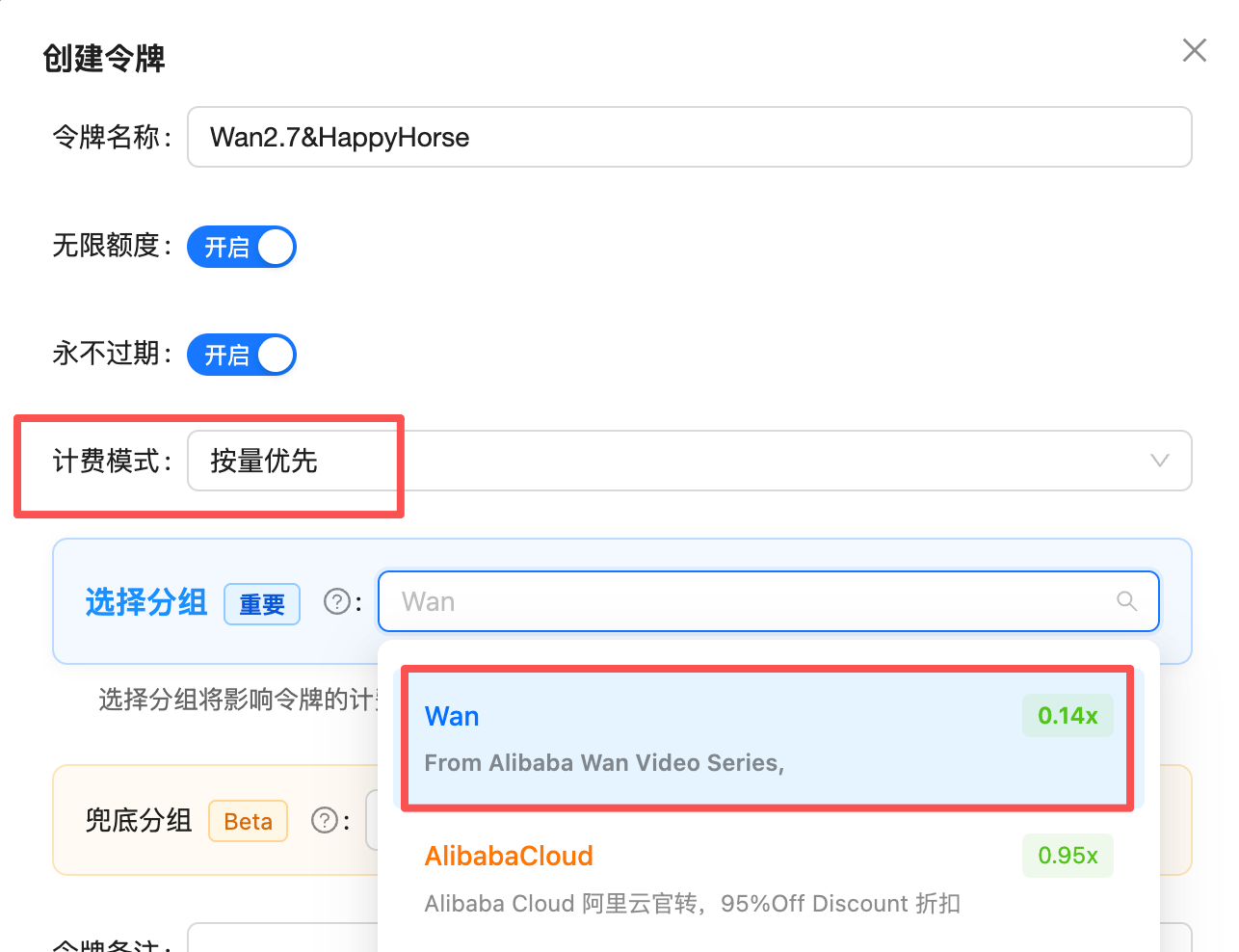
The Wan and [HappyHorse](/en/api-capabilities/happyhorse/overview) series **share a single `Wan&HappyHorse` group** — one Token can call both series. Video models are billed **per second**, so the Token must meet two conditions to route successfully:
1. **Billing model**: choose **Pay-as-you-go Priority** or **Pay-as-you-go** — video is billed per second, so **Pay-per-request Tokens cannot route**
2. **Group**: select a group that includes `Wan&HappyHorse`
 ## Pricing
### Default price = 98% of Alibaba's official price (simple to reason about)
In the console the `Wan&HappyHorse` group shows a rate of **0.14x**, which is denominated in the built-in **RMB** pricing unit. Because APIYI bills in **USD at a fixed 1:7 exchange rate**, the effective conversion is:
```
0.14 (RMB pricing unit) × 7 (fixed exchange rate) = 0.98
```
In other words, the **default price = 98% of Alibaba's official price** — cheaper than buying direct from Alibaba, with no overseas link to build yourself.
> Conversion: **USD price per second = official RMB price × 0.14** (i.e. `× 0.98 ÷ 7`). For example, the official 1080P price of ¥1.0/s → \$0.14/s, exactly the `0.14x` shown in the console.
### Price detail (default price, billed per second)
Wan2.7 text-to-video / image-to-video / reference-to-video are priced the same, with two tiers — `720P` / `1080P` (480P is not supported):
| Resolution | Official price | Our default /s | 5 s | 10 s | 12 s |
| - | - | - | - | - | - |
| `720P` | ¥0.6/s | \$0.084/s | \$0.42 | \$0.84 | \$1.01 |
| `1080P` | ¥1.0/s | \$0.14/s | \$0.70 | \$1.40 | \$1.68 |
* `wan2.7-r2v` defaults to `1080P`, and duration is capped at 10 seconds when reference media includes a video.
* `wan2.7-videoedit` (video edit) output duration follows the source video and is billed by actual output seconds, not by `duration`.
* Prices shown are the **default (98% of official)**; with the maximum top-up bonus, the effective price is roughly the table value **÷ 1.2** (e.g. 1080P 5 s \$0.70 → about \$0.58).
### Stack top-up bonuses for an even lower effective price
After joining the [top-up bonus program](/en/faq/recharge-promotions), credited balance can be boosted up to \~1.2x, pushing the effective price lower still:
```
0.98 ÷ 1.2 ≈ 0.816
```
So large customers can reach as low as **\~81.6% of the official price**.
| Tier | Effective price (vs Alibaba official) | Formula |
| - | - | - |
| Default | **98%** | rate 0.14x × fixed exchange rate 7 |
| With top-up bonuses (max tier for large customers) | **\~81.6%** | 0.98 ÷ 1.2 |
* Billing dimension = **resolution tier × duration (seconds)**; failed tasks are not billed.
* 1:7 is a **fixed settlement exchange rate** (not a preferential rate); it applies uniformly to all USD top-ups.
* For the highest bonus tiers and eligible channels, see [top-up bonuses](/en/faq/recharge-promotions). The latest rate is authoritative in the [console](https://api.apiyi.com/token).
## Related docs
`wan2.7-t2v` live debugging + code samples
`wan2.7-i2v` first frame + driving audio
`wan2.7-r2v` multi-subject reference + voice
`wan2.7-videoedit` outfit / background swap
Wan2.6 series and migration notes
Also Alibaba-based, side-by-side selection guide
Alibaba Cloud official docs (reference): `help.aliyun.com/zh/model-studio/text-to-video-api-reference`. For questions or suggestions, please open a ticket in the [APIYI console](https://api.apiyi.com).
This documentation is built and hosted on [Mintlify](https://mintlify.com), a developer documentation platform.
## Pricing
### Default price = 98% of Alibaba's official price (simple to reason about)
In the console the `Wan&HappyHorse` group shows a rate of **0.14x**, which is denominated in the built-in **RMB** pricing unit. Because APIYI bills in **USD at a fixed 1:7 exchange rate**, the effective conversion is:
```
0.14 (RMB pricing unit) × 7 (fixed exchange rate) = 0.98
```
In other words, the **default price = 98% of Alibaba's official price** — cheaper than buying direct from Alibaba, with no overseas link to build yourself.
> Conversion: **USD price per second = official RMB price × 0.14** (i.e. `× 0.98 ÷ 7`). For example, the official 1080P price of ¥1.0/s → \$0.14/s, exactly the `0.14x` shown in the console.
### Price detail (default price, billed per second)
Wan2.7 text-to-video / image-to-video / reference-to-video are priced the same, with two tiers — `720P` / `1080P` (480P is not supported):
| Resolution | Official price | Our default /s | 5 s | 10 s | 12 s |
| - | - | - | - | - | - |
| `720P` | ¥0.6/s | \$0.084/s | \$0.42 | \$0.84 | \$1.01 |
| `1080P` | ¥1.0/s | \$0.14/s | \$0.70 | \$1.40 | \$1.68 |
* `wan2.7-r2v` defaults to `1080P`, and duration is capped at 10 seconds when reference media includes a video.
* `wan2.7-videoedit` (video edit) output duration follows the source video and is billed by actual output seconds, not by `duration`.
* Prices shown are the **default (98% of official)**; with the maximum top-up bonus, the effective price is roughly the table value **÷ 1.2** (e.g. 1080P 5 s \$0.70 → about \$0.58).
### Stack top-up bonuses for an even lower effective price
After joining the [top-up bonus program](/en/faq/recharge-promotions), credited balance can be boosted up to \~1.2x, pushing the effective price lower still:
```
0.98 ÷ 1.2 ≈ 0.816
```
So large customers can reach as low as **\~81.6% of the official price**.
| Tier | Effective price (vs Alibaba official) | Formula |
| - | - | - |
| Default | **98%** | rate 0.14x × fixed exchange rate 7 |
| With top-up bonuses (max tier for large customers) | **\~81.6%** | 0.98 ÷ 1.2 |
* Billing dimension = **resolution tier × duration (seconds)**; failed tasks are not billed.
* 1:7 is a **fixed settlement exchange rate** (not a preferential rate); it applies uniformly to all USD top-ups.
* For the highest bonus tiers and eligible channels, see [top-up bonuses](/en/faq/recharge-promotions). The latest rate is authoritative in the [console](https://api.apiyi.com/token).
## Related docs
`wan2.7-t2v` live debugging + code samples
`wan2.7-i2v` first frame + driving audio
`wan2.7-r2v` multi-subject reference + voice
`wan2.7-videoedit` outfit / background swap
Wan2.6 series and migration notes
Also Alibaba-based, side-by-side selection guide
Alibaba Cloud official docs (reference): `help.aliyun.com/zh/model-studio/text-to-video-api-reference`. For questions or suggestions, please open a ticket in the [APIYI console](https://api.apiyi.com).
This documentation is built and hosted on [Mintlify](https://mintlify.com), a developer documentation platform.