

Overview
DeepSeek Harness (dsh) is an open-source AI Agent harness developed by DeepSeek AI. It follows an “everything is a plugin” architecture, allowing models, tools, filesystems, terminals, sessions, and workflows to be composed into an extensible agent runtime.
With APIYI, you can run DeepSeek Harness locally and use APIYI’s OpenAI-compatible endpoint to configure models, execute development tasks, and maintain persistent sessions.
🧩 Plugin-based architecture
Compose models, tools, sessions, and workflows through plugins and extend the Agent as needed.
🌐 Web UI
Start a local Web UI with one command and configure models, workspaces, and sessions in the browser.
⌨️ Headless CLI
Submit one-off tasks from the command line for automation scripts, batch jobs, and development workflows.
💾 Persistent sessions
Persist sessions, tool calls, and workspace state to continue tasks and troubleshoot executions.
Project information: DeepSeek Harness is open source under the MIT license. The project repository is
github.com/deepseek-ai/deepseek-harness. It is currently in Developer Preview, so future releases may include breaking compatibility changes.Installation and startup
Start the Web UI with npm
Install Node.js, then run:http://127.0.0.1:3080. On the first run, configure APIYI from the model settings in the Web UI.
Run from source
To run the repository source or contribute to the project:Use the headless CLI
After building from source, submit a one-off task with:Connect APIYI
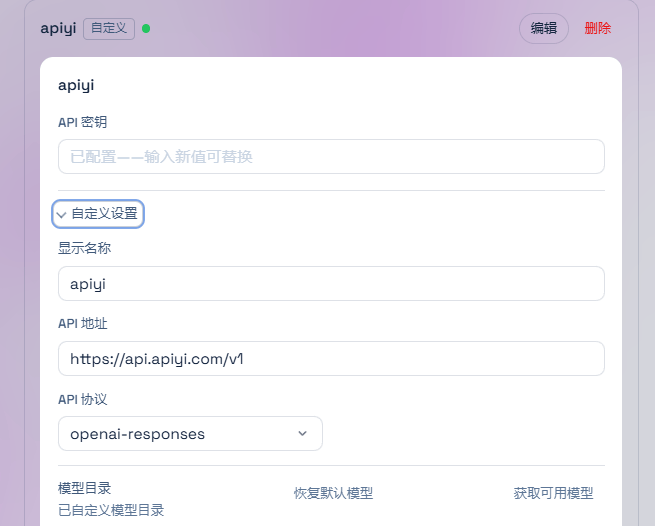
DeepSeek Harness supports a native DeepSeek route and multi-provider routes based onllm-pi-ai. The current configuration uses the apiyi provider, the openai-responses protocol, and the https://api.apiyi.com/v1 endpoint. Its default model is deepseek-v4-pro-0813.
The configuration file is $DSH_HOME/settings.yaml. When DSH_HOME is not set, the default Windows location is typically C:\Users\Administrator\.dsh\settings.yaml.
Option 1: Configure from the Web UI (recommended)
1
Prepare an APIYI token
Create a token in the APIYI Console. Never commit a real token to a project file, shell history, or public log.
2
Open model settings
Start the Web UI, open Settings → Models, and choose Add custom provider.
3
Enter the provider details
Use the following values as a starting point:
Your current configuration uses
deepseek-v4-pro-0813 as the default model. It also maintains other APIYI models in the configuration file; use the current APIYI model list when switching models.4
Save and select a model
Save the provider, select the newly added model in the model picker, and start a new session to test the connection.
Option 2: Configure settings.yaml
For file-based configuration, declare an APIYI provider in$DSH_HOME/settings.yaml and reference the token through an environment variable:
apiKeyEnv is only a credential reference. Do not put the actual token in settings.yaml. To add another model, add its model ID to the models list.
Common usage patterns
Local Web Agent
Use the browser-based Web UI for code analysis, file organization, test debugging, and project maintenance. Choose a workspace for the session, then describe the goal and constraints in natural language.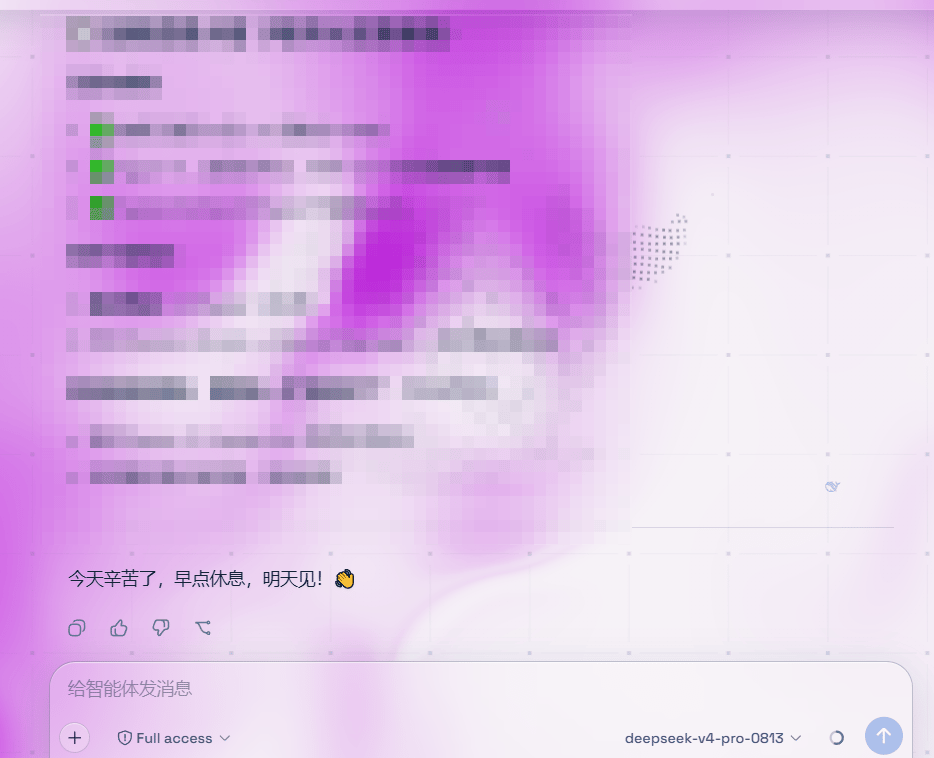
Automated tasks
The headless profile runs one task and prints the final response, making it suitable for local scripts and automation workflows:Python SDK
DeepSeek Harness providesdeepseek-harness-sdk, which can start a runtime and call an Agent from Python. Note that the bundled Python runtime uses deepseek-official by default; it does not automatically inherit the apiyi route used by the current Web/headless configuration.
apiyi route above, the custom Cordis composition must mount @deepseek-ai/dsh-llm-pi-ai and provide apiKeyEnv: APIYI_API_KEY, api: openai-responses, and the APIYI model list through settings.yaml or the composition configuration.
The Python SDK guide lists Linux x64, Linux arm64, and macOS 14 or later on arm64 for the bundled persistent-terminal composition. That composition does not support Windows Agents. Windows users should prefer the Web UI or CLI.
Model selection
APIYI models are updated continuously. Check the latest model list, capabilities, and usage recommendations before choosing a production model:View the latest model recommendations
Review current model recommendations, capability comparisons, and usage guidance. Use the model IDs currently available in the APIYI model list.
Best practices
- Use a separate session ID for each independent task. Reuse an existing ID only when you need to continue the same conversation and persistent shell state.
- The Python SDK example uses a writable workspace and a
danger-full-accesscomposition. Run it in a disposable checkout or container. - Do not put API keys in
cordis.yml,settings.yaml, source code, or commit logs. Prefer the Web UI credential store or an environment-variable reference. - DeepSeek Harness is in Developer Preview. Before upgrading, confirm that your plugin configuration and model routes remain compatible.
Frequently asked questions
Which provider and model does the current configuration use?
Which provider and model does the current configuration use?
The current configuration uses the
apiyi provider, the openai-responses protocol, the https://api.apiyi.com/v1 Base URL, and deepseek-v4-pro-0813 as the default model.Which Base URL and protocol should I use for APIYI?
Which Base URL and protocol should I use for APIYI?
Use
https://api.apiyi.com/v1 as the Base URL and openai-responses as the protocol, matching the current configuration. Do not change the protocol without confirming endpoint compatibility.Why does the model picker not show my model?
Why does the model picker not show my model?
Check that the Provider ID is a non-empty lowercase value, the model ID is correct, and the saved configuration belongs to the
llm-pi-ai provider. The current default is deepseek-v4-pro-0813; a custom model must be included in the models list before it can be selected.How do I fix MISSING_CREDENTIAL?
How do I fix MISSING_CREDENTIAL?
In the Web UI, return to Settings → Models and save credentials for the provider. With
settings.yaml, confirm that APIYI_API_KEY is set and that apiKeyEnv points to that environment variable.What should I do if model discovery returns 401?
What should I do if model discovery returns 401?
Check the APIYI token and Base URL first. DeepSeek Harness uses
GET /models for model discovery on OpenAI-compatible custom providers. If an endpoint does not provide that route, enter the model ID manually.Can I run the Python SDK on Windows?
Can I run the Python SDK on Windows?
The bundled persistent-terminal composition does not support Windows Agents. Windows users can use the Web UI or CLI; for the Python SDK, follow the platform requirements in the project documentation.
What should I do if an upgrade breaks the configuration?
What should I do if an upgrade breaks the configuration?
The project is in Developer Preview, so upgrades may include breaking changes. Recheck the provider configuration, model ID, and plugin composition against the latest project documentation.
Related resources
APIYI quickstart
Get an API key and learn about Base URLs and basic API usage.
APIYI model recommendations
Review current models, capabilities, and usage guidance.
DeepSeek Harness repository
github.com/deepseek-ai/deepseek-harnessDeepSeek Harness provider setup
Review the project documentation for provider, credential, and model configuration.
Get help
Enterprise WeChat support

Email support
Support: support@apiyi.comBusiness inquiries: business@apiyi.com